IC Markets





























How to Change Leverage on the MT5 Mobile App (and Why You Can't Do It in the App)
The MT5 app has no leverage setting, because leverage belongs to your broker account, not the platform. Here is where to change it, what limits apply and how to check the new value.
 WriterAbir KhanWriterWrites the guides · checks every figure against primary sources View profileAbout Abir →
 Market analysisTanbir Habib RiyadForex & Crypto AnalystForex and crypto analyst · technical and fundamental analysis View profileAbout Tanbir →
 Fact-checking & riskJannatul FerdaushFact-Checker & Risk AnalystFact-checks every figure · risk analysis · Applied Statistics, University of Dhaka View profileAbout Jannatul →
 Trading reviewJowel RanaCo-Founder & Forex TraderCo-founder · forex trader · reviews guides from a trader's view View profileAbout Jowel →
 Final approvalRanjan NiskrityFounder, Owner & Forex TraderFounder and owner · forex trader · signs off every guide View profileAbout Ranjan →
You cannot change leverage inside the MetaTrader 5 mobile app. Leverage is a setting on your trading account at the broker, and the MT5 app only reads it. To change it, log in to your broker's client area or the broker's own app, choose the trading account, and pick a new leverage from the list the broker allows.
The change usually applies within minutes, and some brokers ask you to close open positions first. This page shows the steps, the limits regulators set, how to check the new leverage in MT5 and how to decide which level makes sense for your account size.
| Where leverage is set | Your broker's client area or broker app |
|---|---|
| Inside the MT5 app | View only, no setting to change it |
| Typical condition | Some brokers require no open positions |
| EU, UK and Australia retail cap | 1:30 on major pairs, 1:20 on gold |
| What really sets risk | Your lot size, not the leverage number |
Why the app has no leverage button
MetaTrader is software that connects to your broker's server. The server holds your account's settings: its currency, its leverage, its margin call and stop out levels. MetaTrader displays those settings and sends your orders, but it cannot change account terms. That is the same on the desktop terminal, the web terminal and the iPhone and Android apps.
Brokers keep leverage changes in their own systems because they must apply regulatory caps, check your account type and sometimes ask about your experience before offering higher levels. Those checks live in the client area, not in MetaTrader.
Steps to change leverage on your phone
- Open your broker's client area in a mobile browser, or the broker's own app if it has one.
- Log in with your client-area email and password, not your MT5 account password.
- Go to My accounts, Trading accounts or Account settings and select the MT5 account.
- Choose Change leverage or Account settings, then pick the new level from the list.
- Close open positions first if the broker asks, then confirm.
- Reopen the MT5 app; the new leverage applies to new margin calculations.
Button names differ by broker, but the path is always through the client area. Our broker guides show the exact screens; see Exness leverage, XM leverage and IC Markets leverage.
Limits you cannot go past
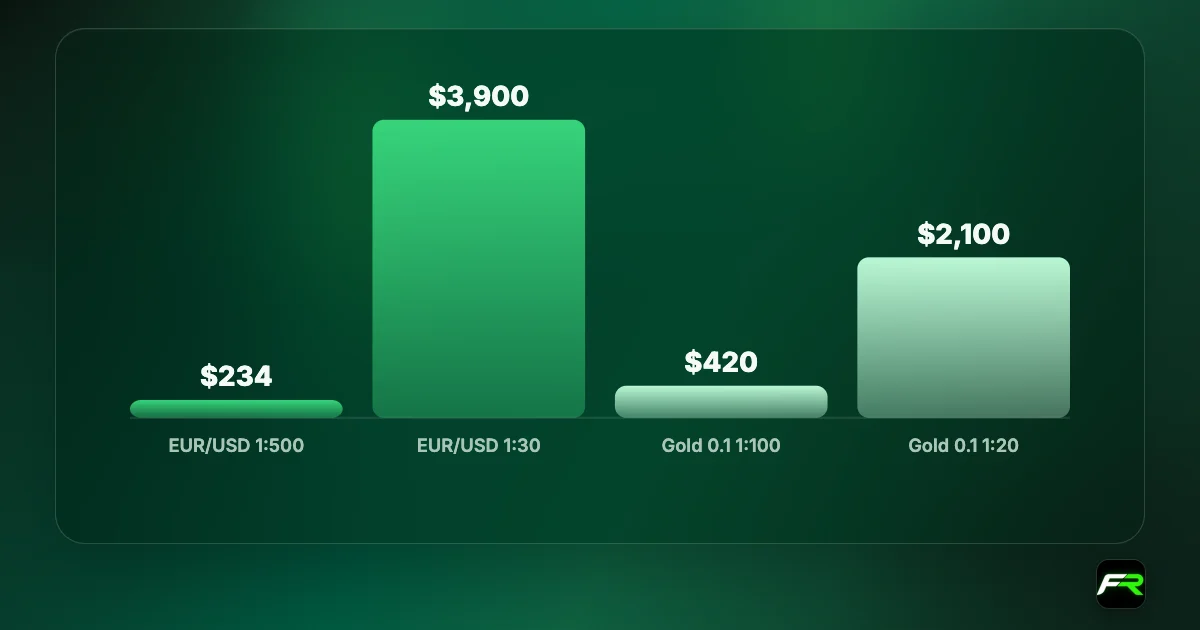
Regulators cap leverage for retail clients in many places. In the EU, the European Securities and Markets Authority set limits that national regulators apply: 1:30 on major currency pairs, 1:20 on minor pairs, gold and major indices, 1:10 on other commodities, 1:5 on individual shares and 1:2 on crypto. The UK's FCA and Australia's ASIC apply the same or very similar caps. Brokers' offshore entities can offer far more, sometimes 1:1000 or higher, but those entities carry weaker protection.
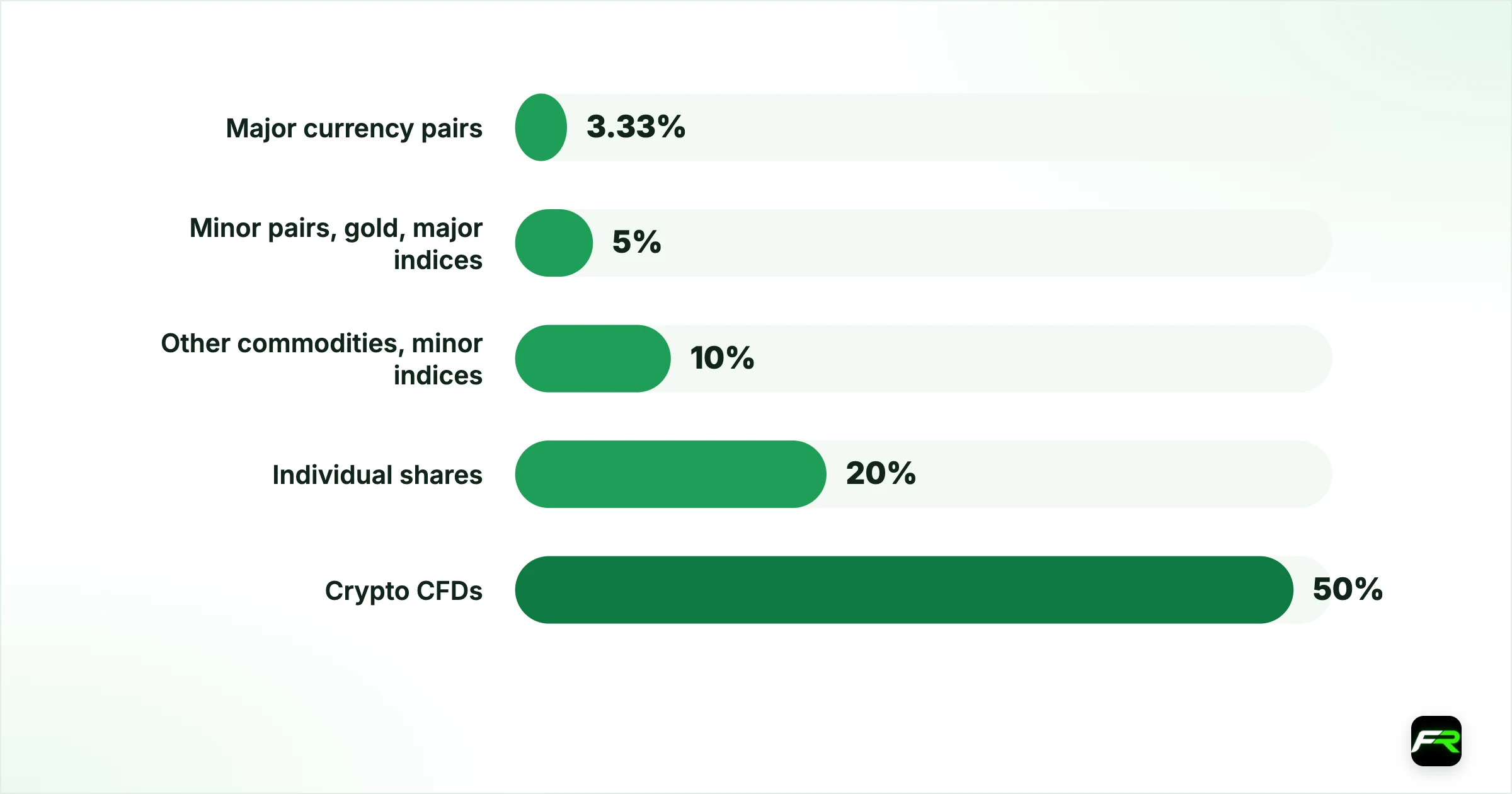
| Instrument (EU/UK/AU retail) | Maximum leverage | Margin as % of position |
|---|---|---|
| Major currency pairs | 1:30 | 3.33% |
| Minor pairs, gold, major indices | 1:20 | 5% |
| Other commodities, minor indices | 1:10 | 10% |
| Individual shares | 1:5 | 20% |
| Crypto CFDs | 1:2 | 50% |
Even on offshore accounts, brokers set lower leverage for some instruments and often reduce it as your equity grows or around weekends and major news. The leverage you choose is a maximum, not a promise for every symbol.
How to check the leverage MT5 is using
On desktop MT5, hover over your account in the Navigator, or open the account list, and the leverage shows next to the account number. Some broker builds also show it in the account details window. On the mobile app, the account's details screen under Settings lists the server and, on many builds, the leverage. The simplest test on any device is to open the order window for a symbol: the margin shown for one lot changes when leverage changes.
If the margin for the same lot size is unchanged after you switched, close and reopen the app, or log out and back in. Still unchanged after an hour? The request may need approval, so check the client area for a notice.
A trader in Nairobi with a $500 account changes leverage from 1:100 to 1:500 to open bigger positions. The margin for 0.1 lots of EUR/USD falls from about $117 to about $23. Nothing else about the trade changes: a 20-pip loss still costs $20. The trader instead keeps 0.05 lots, so a 20-pip stop risks $10, or 2% of the account, which fits the plan at either leverage.
Choosing a level that suits your account
Higher leverage lowers the margin each trade locks up. It does not change how much you gain or lose per pip, because that depends on lot size. The danger is that low margin makes it easy to open positions far too large for the account, and a short move against them can wipe out the balance.
A sensible approach is to choose leverage that leaves plenty of free margin for your normal position sizes, then set each trade's size from your risk. The leverage calculator shows margin at different levels, and the position size calculator sets the lot size from your stop.
Write down your maximum lot size per trade before you raise leverage. If higher leverage tempts you to break that number, keep the lower setting.
Moving to a broker's offshore entity to get higher leverage usually means losing protections such as a local compensation scheme and negative balance protection rules set by a top-tier regulator. Check which entity holds your account before you switch.
Leverage caps are from ESMA's retail CFD measures, which the FCA and ASIC mirror. Broker limits change, so check the current figures in your client area.
Frequently asked
Can I change leverage in the MT5 app?
No. The MT5 app shows your account settings but cannot change them. Leverage is set in your broker's client area or the broker's own app. Choose the account, pick a new leverage from the broker's list, confirm, and the MT5 app will use it for new margin calculations.
Why does my broker say close all positions to change leverage?
Changing leverage changes the margin on every open trade. Some brokers avoid recalculating live positions by asking you to close them first. Others allow changes with positions open but check that the new margin would not trigger a margin call.
What leverage should a beginner use?
Use whatever leverage leaves comfortable free margin for small positions, then size each trade so a loss costs 1% to 2% of your account. Leverage itself does not change your profit or loss per pip; lot size does. Many beginners use 1:30 to 1:100.
How do I see my leverage on MT5 mobile?
Open Settings and tap your account to see its details; many builds list leverage there. If yours does not, open an order window and note the margin for one lot. A lower margin after a change confirms the new leverage is active.
Why is my gold leverage lower than my account leverage?
Brokers apply separate leverage per instrument group. Gold, indices and crypto usually get less leverage than major pairs, and regulated entities in the EU, UK and Australia cap gold at 1:20 for retail clients. The Specification window shows the margin rate used.
Does higher leverage mean higher spreads?
No. Spreads and commissions depend on the account type and the market, not the leverage setting. Higher leverage only lowers the margin held for each position. Costs per lot stay the same at 1:30 or 1:500.
Official sources: MetaTrader 5 Help · ESMA: CFD product intervention measures
Related reading
The team behind this guide
Researched, checked and approved by five forex specialists
Every guide is written, fact-checked and edited before it goes live, and updated when the facts change. Spotted an error? Tell us.