 IC Markets




























MetaTrader 4 vs MetaTrader 5
MetaTrader 4 and MetaTrader 5 are the most popular trading platforms in the forex trading industry around the world. The two also have sophisticated charting, technical indicators, and automated trading facilities. MT4 is orientated mainly on forex trading, whereas MT5 encourages other asset classes, as well as providing more tools. The choice of the platform has to be done based on the trading style, the preference in the market and the technical requirements.
 WriterAbir KhanWriterWrites the guides · checks every figure against primary sources View profileAbout Abir →
 Market analysisTanbir Habib RiyadForex & Crypto AnalystForex and crypto analyst · technical and fundamental analysis View profileAbout Tanbir →
 Fact-checking & riskJannatul FerdaushFact-Checker & Risk AnalystFact-checks every figure · risk analysis · Applied Statistics, University of Dhaka View profileAbout Jannatul →
 Trading reviewJowel RanaCo-Founder & Forex TraderCo-founder · forex trader · reviews guides from a trader's view View profileAbout Jowel →
 Final approvalRanjan NiskrityFounder, Owner & Forex TraderFounder and owner · forex trader · signs off every guide View profileAbout Ranjan →
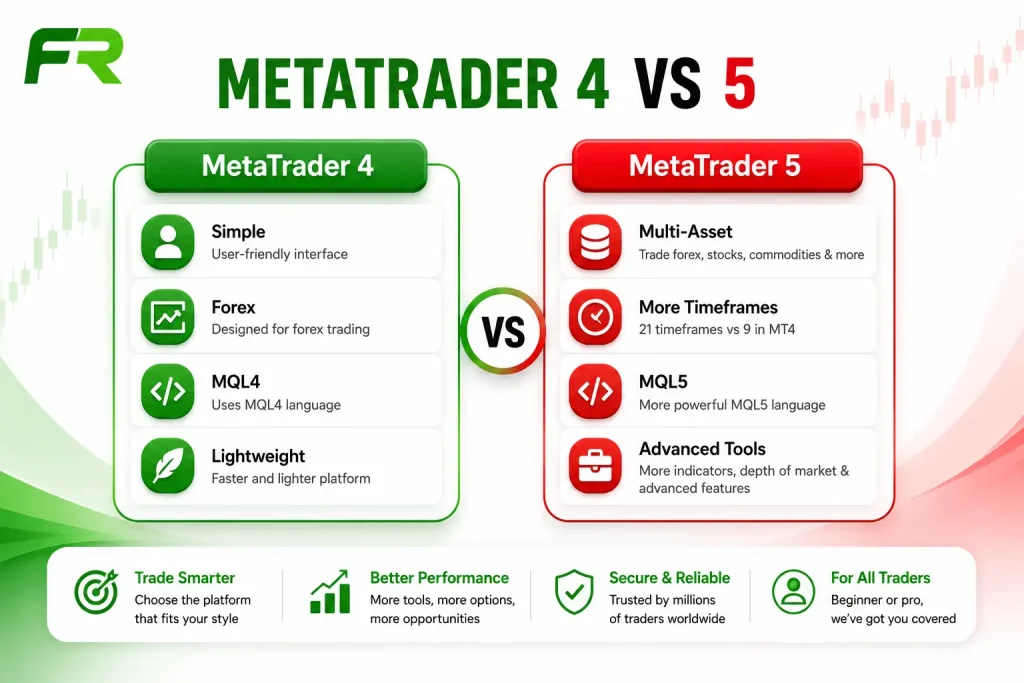
MetaTrader 4 and MetaTrader 5 are the two most widely used trading platforms in retail forex. Both were developed by MetaQuotes Software, both support automated trading, custom indicators, and Expert Advisors, and both are available free of charge through most retail forex brokers. Many traders wonder not whether to use one of them but which one suits their situation.
The right platform depends on the markets you trade, your experience level, and whether you value simplicity or advanced trading tools. This guide compares MT4 and MT5 side by side, highlighting the practical differences that matter most to everyday traders.
How MetaTrader Became the Standard for Retail Forex?
Before MT4 arrived in 2005, most brokers relied on their own trading platforms, which often differed in features and usability. They varied enormously in quality, tools, and stability. Traders who switched brokers had to relearn an entirely different interface each time. Custom indicators and automated strategies were either unavailable or locked to specific platforms.
MetaQuotes introduced MT4 as a standardized platform that brokers could license and offer to clients. Traders who learned it at one broker could move to another broker using the same platform without relearning anything. The MQL4 programming language allowed traders and third-party developers to create custom indicators, scripts, and Expert Advisors that could be shared and used across any MT4 installation globally.
Because traders could keep the same platform across different brokers while using custom tools, MT4 quickly became the industry standard. By the time MetaTrader 5 launched in 2010, MT4 had become so deeply established in retail forex that MT5 faced an uphill adoption challenge despite being technically superior in many ways.
Both platforms remain widely supported today. MT4 holds a larger share of the existing retail forex user base simply due to its longer history. MT5 has grown steadily, particularly among traders who deal in multiple asset classes or who use algorithmic strategies that benefit from its more powerful backtesting engine.
MetaTrader 4: What It Is and Who It Works Best For
MetaTrader 4 was designed with retail forex traders in mind. That focus is reflected in its interface, which keeps everyday trading tasks simple and easy to access.
The platform includes nine timeframes, from one minute to monthly. It offers three chart types: line, bar, and candlestick. The built-in indicator library includes the most widely used technical tools: moving averages, RSI, MACD, Bollinger Bands, stochastic oscillator, ATR, and others. Custom indicators written in MQL4 can be added to expand the library further.
MT4 includes the order types most forex traders use every day. Market orders execute at the current price. Limit orders execute at a specified price if the market reaches it. Stop orders trigger a market order when price reaches a specified level. Stop-loss and take-profit levels can be attached to any open position and modified while the trade is running.
The MQL4 language allows traders to automate strategies through Expert Advisors. These are programs that can open, manage, and close trades automatically based on coded rules. The MetaTrader Market and various third-party sites offer thousands of pre-built Expert Advisors and indicators, many of them free.
Although MetaTrader 4 was originally designed for forex trading, many brokers also provide CFDs on indices, commodities, cryptocurrencies, and other instruments through the platform. It is the platform most forex-only retail traders have used for the longest time, which means the community knowledge base, available indicators, and Expert Advisors for MT4 are extensive.
MetaTrader 5: What It Adds and Who Benefits
Unlike MT4, MetaTrader 5 was built to support multiple financial markets from the beginning. MetaTrader 5 is built to support forex and multiple asset classes, including stocks, futures, commodities, and indices, although the available instruments depend on your broker. For traders who want to trade across asset classes without switching platforms, MT5 provides that capability natively.
MT5 offers 21 built-in timeframes, giving traders greater flexibility when analyzing the market. MT5 includes an integrated economic calendar powered by MetaQuotes, allowing traders to monitor scheduled macroeconomic events without leaving the platform.
MT5 uses the MQL5 programming language, which is more powerful than MQL4 and supports object-oriented programming. This makes building complex algorithmic strategies more efficient and allows for more sophisticated strategy logic. MT5’s Strategy Tester supports multi-currency backtesting, multi-threaded optimization, and distributed cloud testing for faster strategy development.
MT5 supports both exchange-style and OTC trading models, with execution behavior Your broker may offer and account configuration. Hedging, which is the ability to hold simultaneous long and short positions in the same instrument, requires specific account configuration in MT5. In MT4, hedging is available by default on most retail accounts. If you rely on hedging strategies, you should confirm the account type before switching platforms.
MT5 is generally a better fit for traders who want access to multiple asset classes or more advanced analytical tools. It is also the platform MetaQuotes is actively developing, meaning new features and improvements appear on MT5 first.
Side-by-Side: The Real Differences That Matter When You’re Actually Trading
Asset Coverage
MT4 supports forex, CFDs, and some futures contracts depending on the broker. MT5 supports all of those plus equities and exchange-traded instruments, again depending on the broker’s offering. If you only trade forex, the wider asset support offered by MT5 may not be a deciding factor. If you want to trade EUR/USD alongside S&P 500 futures or individual stocks, MT5 is the only option between the two.
Timeframes
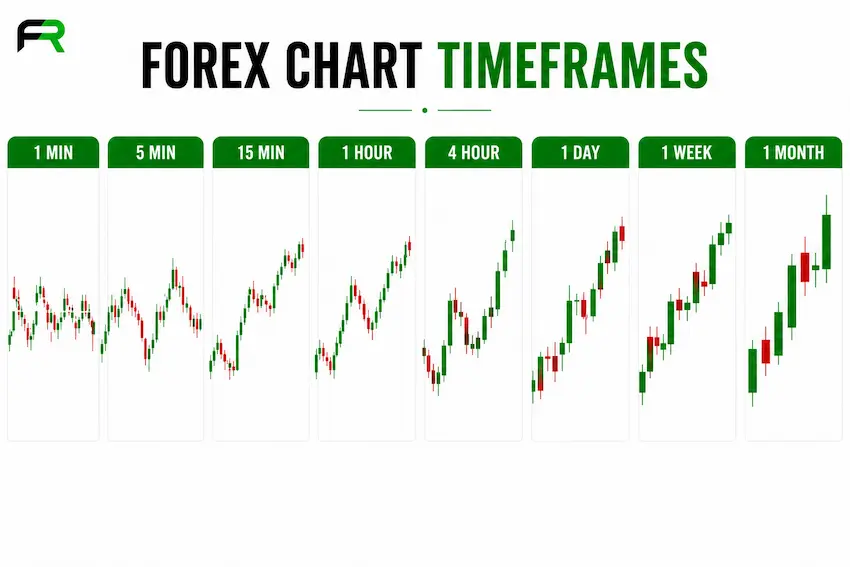
MT4 offers nine timeframes: M1, M5, M15, M30, H1, H4, D1, W1, and MN. MT5 offers 21 timeframes, adding M2, M3, M4, M6, M10, M12, M20, H2, H3, and H6. For most trading strategies, the MT4 selection is sufficient. Traders who specifically use 2-hour or 3-hour charts in their analysis will find only MT5 supports those natively.
Indicators and Tools
MT4 includes 30 built-in indicators and 24 analytical objects. MT5 includes 38 built-in indicators and 44 analytical objects, adding tools like the economic calendar, depth of market panel, and additional drawing tools. The number of built-in tools matters less than the large selection of custom indicators available for both platforms.
Programming Language
MQL4 and MQL5 are not interchangeable. An Expert Advisor or indicator written in MQL4 cannot run on MT5 without being rewritten or converted. This is the most practical barrier for traders who have existing automated strategies on MT4. Moving custom indicators or Expert Advisors from MT4 to MT5 usually requires rewriting or conversion.
Hedging
MT4 allows hedging by default on most retail forex accounts. MT5 was originally released with a netting account model only, but MetaQuotes added hedging account support in later versions. Traders who use hedging strategies should verify with their broker which account type is available and ensure it is configured before placing trades.
Order Types and Execution: A Practical Comparison
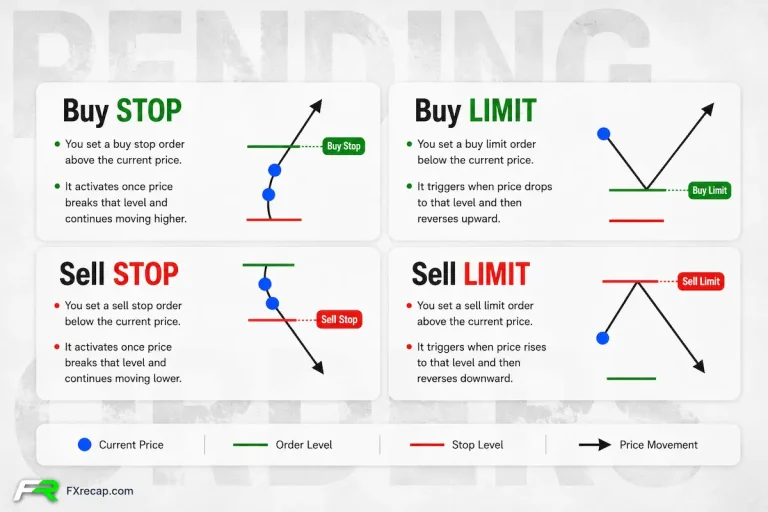
MT4 supports four pending order types: Buy Limit, Sell Limit, Buy Stop, and Sell Stop. These cover the most common entry methods: entering at a better price than current market, or entering when price breaks through a level.
MT5 supports six pending order types, including Buy Stop Limit and Sell Stop Limit, providing greater flexibility for advanced order execution. These combine a stop trigger with a limit entry, allowing a trader to specify that once a breakout level is reached, the entry should only fill at a specified limit price rather than at market. This order type is useful for traders who want to enter on breakouts but want to avoid chasing the price if it moves rapidly through the trigger level.
Both platforms display the spread on each instrument, which is the difference between the bid and ask price and represents the immediate cost of entering a trade. FXRecap’s guide on bid and ask in forex explains how spread affects entry and exit pricing in practical terms.
Order execution quality is determined mainly by your broker’s infrastructure, not by whether you use MT4 or MT5. The trading platform simply sends your order, while your broker’s servers handle execution. Slippage, requotes, and execution speed are broker-side factors. Choosing a well-regulated, low-latency broker matters more for execution quality than the choice between MT4 and MT5.
Charting and Technical Analysis Tools
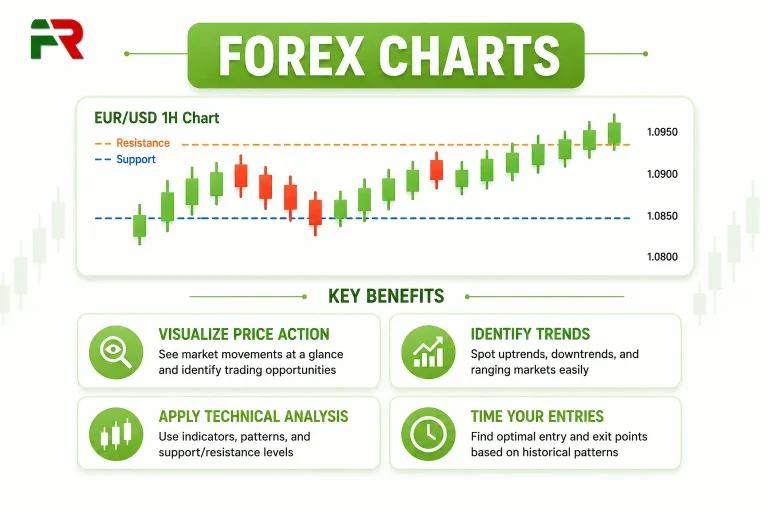
Both MT4 and MT5 include the same core charting functionality: multiple chart windows open simultaneously, the ability to apply indicators to any timeframe, drawing tools for trendlines and levels, and template saving for consistent chart setups across sessions.
MT5 adds a few practical improvements to the charting interface. When supported by the broker, MT5’s Depth of Market panel displays available liquidity at different price levels. This information is standard in equity trading and adds context to breakout and reversal setups in forex.
If your strategy relies mainly on price action and chart analysis, both platforms provide the essential charting tools you need.
Custom indicator compatibility is the main charting limitation when moving between platforms. An indicator built for MT4 does not work on MT5. Traders who have spent time building or collecting a set of custom MT4 indicators will need to find MT5 equivalents or have the indicators converted before switching.
Algorithmic Trading and Strategy Testing
Both MT4 and MT5 include Expert Advisors that can open, manage, and close trades automatically based on programmed rules. The difference lies in the tools available to build and test those strategies.
MT4’s strategy tester runs single-currency backtests on historical data using a single processing thread. For straightforward forex strategies, this works adequately. For complex strategies that involve multiple timeframes or require large historical datasets, the testing process is slow.
MT5’s strategy tester supports multi-currency and multi-asset backtesting, runs on multiple processor threads simultaneously, and uses a more sophisticated tick simulation model that produces more realistic test results. For traders who build and rely on algorithmic strategies, MT5’s backtesting capability is a meaningful practical advantage.
The MetaTrader Market, accessible within both platforms, provides a library of commercial Expert Advisors and indicators. Many are available for free trial periods before purchase. The MT4 library is larger due to the platform’s longer history, but the MT5 library has grown substantially and continues to expand.
Trading Psychology and How Each Platform Affects It
The platform you use every day can influence your trading habits more than many traders realize. A simple workspace helps many traders stay focused on their trading plan instead of unnecessary features. A more feature-rich interface can either sharpen analysis or create noise, depending on how it is used.
MT4’s simplicity is a major reason experienced forex traders continue using it long after they switch to MT5. When the layout is familiar and uncluttered, the mental load of navigating the MetaTrader is minimal, which leaves more attention for the actual trading decisions.
MT5’s built-in economic calendar is a practical psychological tool. Traders who can see upcoming high-impact events directly within the platform are more likely to plan around them rather than be caught off guard by news-driven volatility. A Madrid-based trader described how having the calendar integrated into MT5 shifted his approach from reacting to each price movement to planning trades around known risk events, which reduced overtrading significantly.
Both platforms display margin levels and account equity in real time on the trading panel. Watching the equity number move with every pip is something new traders need time to adjust to. Keeping position sizes appropriate for the account balance is the practical way to reduce the emotional pressure of that number fluctuating, regardless of which platform is displaying it.
FXRecap’s guide on forex risk management covers position sizing and the behavioral side of managing open trades in detail.
Which Platform Should You Start With
For a trader who is new to forex and plans to focus on currency pairs, MT4 is the lower-friction starting point. The interface is simpler, the learning curve is shorter, and the available community resources, tutorials, and indicator libraries specifically for MT4 are extensive. Many beginners find MT4 easier to learn because its interface is straightforward and less crowded.
For a trader who wants to trade multiple asset classes right from the beginning, MT5 is the correct choice from day one. Starting on MT4 and then switching later means relearning the interface and potentially losing access to indicators and Expert Advisors built for MT4.
For a trader who already has algorithmic strategies or intends to build them, MT5 is worth starting with despite the steeper initial learning curve, because the backtesting tools and MQL5 language are significantly more capable than their MT4 equivalents.
Practicing on a demo account before committing to either MetaTrader with real capital is the standard starting point. FXRecap’s guide on forex demo trading explains how to use demo accounts effectively to build platform familiarity before going live.
Moving Between Platforms: What Changes and What Does Not
Traders who move from MT4 to MT5 find the interface familiar enough that navigation is not difficult. The chart types, order placement process, and position management work the same way. The differences are in the additional features, the expanded timeframe selection, and the programming language.
What requires attention during a switch is the indicator and Expert Advisor compatibility issue. Any custom tools built for MT4 need to be either converted or replaced with MT5 equivalents. For traders who have invested time in a set of custom indicators or automated strategies, this is the main practical cost of switching.
Chart templates saved in MT4 do not transfer to MT5. Traders who rely on consistent chart setups will need to rebuild their templates on the new MetaTrader. This is a one-time task but worth accounting for before the switch.
The broker relationship does not necessarily change when switching platforms. Many brokers offer both MT4 and MT5 accounts, sometimes with the option to have one of each. Checking with the broker before switching confirms whether a new account is needed or whether the existing account can be migrated.
The Future of Both Platforms
In 2020, MetaQuotes discontinued the sale of new MetaTrader 4 server licenses while continuing to support existing MT4 installations. Existing MT4 licenses remain active and the application continues to be supported, but new broker deployments use MT5. In practice the long-term trajectory is toward MT5 becoming the dominant platform as MT4 gradually phases out from new broker offerings.
MT5 development continues actively. MetaQuotes has added features including improved mobile applications, cloud-based strategy testing, and tighter integration with external data services. MetaQuotes continues to enhance MT5 with platform improvements, cloud capabilities, and performance updates. Future features should be considered subject to official announcements.
Existing MT4 installations continue to receive support, although MetaQuotes focuses ongoing MetaTrader development on MT5. No forced migration is occurring. For traders starting today, learning MT5 may provide better long-term flexibility while MT4 remains widely available.
Summary
MT4 and MT5 are both capable platforms with genuine differences that matter depending on how and what you trade. MT4 is simpler, forex-focused, and backed by a larger existing library of community-built tools. MT5 is more feature-complete, supports multiple asset classes, offers better algorithmic testing, and is the platform receiving active development.
For a new trader starting with forex only, MT4 is a reasonable starting point. For anyone planning to expand beyond forex, building automated strategies, or starting fresh without existing MT4 tools to preserve, MT5 is the better long-term choice.
No trading platform guarantees better results. Consistent analysis, disciplined risk management, and well-planned trade execution have a far greater impact on long-term performance. Both platforms provide the tools to do those things well. The best choice is the platform that matches your trading style, markets, and long-term goals.
FXRecap’s education library covers the related skills in depth: forex trading strategies for building approaches that work on either MetaTrader, forex indicators for the technical tools available on both, and start trading forex as a beginner for the full practical roadmap from platform selection through to live trading.
The team behind this guide
Researched, checked and approved by five forex specialists
Every guide is written, fact-checked and edited before it goes live, and updated when the facts change. Spotted an error? Tell us.
Related Articles
 Education
9 min read
Education
9 min read

 Education
7 min read
Education
7 min read
 Education
20 min read
Education
20 min read
 Education
7 min read
Education
7 min read
 Education
9 min read
Education
9 min read
 Education
7 min read
Education
7 min read