 IC Markets





























Best Brokers for TradingView 2026
Interactive Brokers leads for professional multi-asset traders, Pepperstone for forex and CFD traders who want tight spreads with chart trading, OANDA for straightforward forex, and Capital.com for a first live account with a low entry point. Test order placement through TradingView's panel on a demo and check that fills match the prices you saw.
 WriterAbir KhanWriterWrites the guides · checks every figure against primary sources View profileAbout Abir →
 Market analysisTanbir Habib RiyadForex & Crypto AnalystForex and crypto analyst · technical and fundamental analysis View profileAbout Tanbir →
 Fact-checking & riskJannatul FerdaushFact-Checker & Risk AnalystFact-checks every figure · risk analysis · Applied Statistics, University of Dhaka View profileAbout Jannatul →
 Trading reviewJowel RanaCo-Founder & Forex TraderCo-founder · forex trader · reviews guides from a trader's view View profileAbout Jowel →
 Final approvalRanjan NiskrityFounder, Owner & Forex TraderFounder and owner · forex trader · signs off every guide View profileAbout Ranjan →


Exness

XM

IC Markets

LiteFinance

FP Markets

AvaTrade

Octa

RoboForex
Disclosure: "Visit Broker" links are partner (affiliate) links. FX Recap may earn a commission at no cost to you. Trading involves significant risk of loss. T&Cs apply.
TradingView is the most widely used charting platform on the market, with over 60 million traders relying on it daily. But it is not a broker. Every chart you draw, every level you mark, every Pine Script alert you fire off still needs a regulated broker standing behind it to place the actual trade.
That gap between analysis and execution is where most traders quietly lose money. You spot a clean EUR/USD breakout, the setup looks perfect, and then your broker re-quotes you, delays the fill, or does not support the instrument through TradingView. The chart did its job. The broker did not.
At FX Recap, we spent months reviewing broker integrations, opening real accounts, and testing order fills directly from TradingView panels. The brokers on this page earned their spots not because they appear in TradingView’s partner list, but because they performed when it counted: fast execution, honest pricing, solid regulation, and a TradingView connection that works.
FX Recap Top Picks at a Glance
Scores reflect integration quality, trading fees, regulation, and real-money execution testing by the FX Recap team. Spread data is sourced from broker disclosures and verified against live testing. Minimum deposit figures are accurate as of March 2026.
| Broker | Key Regulation | Best For | Min Deposit | Pricing |
| Interactive Brokers | SEC, FINRA, SIPC (US); FCA (UK); ASIC (AU); MAS (SG); Central Bank of Hungary (EU); SFC (HK); CIRO (CA) | Professional & multi-asset traders | $0 cash; $2,000 margin | Forex from 0.1 pip; equities from $0.005/share (Pro) |
| Pepperstone | FCA (UK); ASIC (AU); CySEC (CY); DFSA (UAE); BaFin (DE); CMA (KE); SCB (BS) | Forex & CFD traders | $0 — no minimum | Razor: 0.0 pips + $3.50/side per lot (MT4/5); $7 round-trip on TV; Standard: 0.6 pip markup, no commission |
| Saxo | Danish FSA (primary); FCA (UK); FINMA (CH); MAS (SG); ASIC (AU); DFSA (UAE); 13 countries total | Premium multi-asset traders | $0 Classic; VIP: EUR 1,000,000+ | Classic EUR/USD from 0.6 pips; Platinum/VIP: tighter pricing |
| Capital.com | FCA (UK); CySEC (CY); ASIC (AU); SCA (UAE); SCB (BS) | CFD & forex traders | $20 by card; no minimum for bank wire | EUR/USD avg 0.6 pips; zero commission on all instruments |
| OANDA | NFA/CFTC (US); FCA (UK); ASIC (AU); MAS (SG); JFSA (JP); CIRO (CA); FSC (BVI) | Forex traders | $0 all entities; Core requires $10,000 | Standard: spread-only; Core: from 0.0 pips + commission; $10/month inactivity fee after 24 months |
| FOREX.com | NFA/CFTC (US); FCA (UK); MAS (SG); ASIC (AU); FSA (JP); CIMA (Cayman); parent: StoneX (NASDAQ) | Forex & CFD variety | $100 debit card; no minimum for wire | Standard: ~1.0-1.2 pips EUR/USD; RAW: tighter spreads + $7/100k commission |
| Tastytrade | FINRA; NFA; SEC; SIPC — US only | US options & futures | $0 cash/IRA; $2,000 margin | Stocks/ETFs: $0; Options: $1/contract open, $0 close (cap $10/leg); Futures: $1.25/side; Micro: $0.50/side |
Always verify current pricing directly with each broker before opening an account. Spreads vary with market conditions and account tier.
What TradingView Does (And What It Does Not)
TradingView is a browser-based charting and analysis platform. It provides over 100 built-in technical indicators, custom Pine Script strategies, multi-timeframe analysis, real-time data across most major markets, and a social trading community where millions of traders share ideas. It also has a broker trading panel, which is where most of the confusion starts.
The trading panel lets you connect a supported broker account and place orders directly from your chart. What TradingView cannot do is auto-execute Pine Script strategies to every broker in existence. Native live trading is available only for a set of integrated brokers. For other setups, traders route signals through webhooks to external automation services, then to broker APIs.
The distinction matters because many traders assume their Pine Script strategy will trade itself the moment they switch it on. That only happens with brokers that have built direct API execution into TradingView’s panel, or through a carefully configured webhook-to-broker pipeline.
TradingView’s Pine Script environment is a sandboxed system. It processes bar-by-bar data, runs backtests using a broker emulator, and fires alerts. Those alerts are the bridge to real execution. The cleaner and more direct that bridge is, the less slippage, delay, and error you face in live markets.
How TradingView Broker Integration Works
There are two types of TradingView broker connections worth understanding before you pick a broker.
Native Panel Trading
A handful of brokers have direct API integration built into TradingView’s broker panel. You log into your account through TradingView, see your open positions and balance, and place orders from the chart. Interactive Brokers, OANDA, Pepperstone, and several others on this list support this. Order placement, amendments, and closures all happen inside TradingView without switching platforms. For active traders, this is the preferred setup.
Webhook-Based Automation
For brokers without a native TradingView panel, traders use Pine Script alerts with webhook URLs. When a strategy condition triggers, TradingView sends a JSON payload to a receiving endpoint, which then translates that signal into an API call to your broker. Services like TradersPost act as intermediaries, connecting TradingView to brokers like Alpaca, TradeStation, and others.
Webhook-based setups add a layer of complexity and a small execution delay. Typical alert delivery runs between two and 45 seconds depending on server load. That is acceptable for swing trading and slower strategies, but it creates genuine problems in fast-moving environments where seconds matter.
TradingView Integration Depth by Broker
Based on hands-on testing, here is how the most commonly compared TradingView brokers handle platform connectivity.
| Broker | Native Chart Trading | Asset Classes via TV | Notes |
| Interactive Brokers | Yes | Stocks, Forex, Futures, Options | Deep API integration; TWS-grade tools available in TradingView panel |
| Pepperstone | Yes | Forex, CFDs, Indices, Crypto | Zero-pip spreads on Razor account; among the smoothest integrations tested |
| Saxo | Yes (Pine Script + API) | Stocks, Forex, Options, Futures, ETFs | 5,500+ symbols available; institutional-grade execution quality |
| OANDA | Yes | Forex, CFDs (70+ pairs) | No requotes; spreads disclosed in real time inside TradingView |
| Capital.com | Yes | Forex, CFDs, Crypto | Drag-to-modify charts; fast account setup; $20 minimum deposit |
Top 7 Broker Reviews: The FX Recap Assessment
Interactive Brokers
Interactive Brokers remains the strongest all-round option for traders who want professional-grade market access and direct TradingView execution. IBKR provides access to stocks, ETFs, options, futures, forex, and bonds across exchanges in over 150 markets worldwide. Its commission structure is genuinely competitive: US stock trading runs from $0.005 per share, and forex spreads are among the tightest available to retail accounts.
The TradingView integration with IBKR supports both manual chart trading and Pine Script alert-driven automation. Traders running algorithmic strategies can connect Pine Script alerts via webhooks to IBKR’s API, with broker setups like IB Gateway running in API mode on a VPS for uninterrupted uptime. The Trader Workstation desktop platform runs in parallel to TradingView, giving experienced traders dual visibility over positions and orders.
The one honest drawback is onboarding. Account opening at IBKR is more involved than at most retail brokers, and the platform range can overwhelm newer traders. It is built for people who already know what they want.
- Regulation: SEC, FINRA, SIPC (US); FCA (UK); ASIC (Australia); MAS (Singapore); Central Bank of Hungary (EU); SFC (Hong Kong); CIRO (Canada)
- Minimum deposit: $0 for cash accounts; $2,000 required for margin accounts
- Tradeable via TradingView: Stocks, ETFs, Forex, Futures, Options
- Commission from $0.005 per share for US equities; forex from 0.1 pip with no markup
Pepperstone
Pepperstone consistently earns high marks in independent broker reviews for TradingView execution quality, confirmed by direct testing. On the Razor account, major forex pairs trade with spreads from 0.0 pips. For TradingView users specifically, Pepperstone charges a flat $7 USD round-trip commission per standard lot on Razor accounts — this differs from the $3.50/side quoted for MT4/MT5 users. On the Standard account there is no commission, and EUR/USD carries a 0.6 pip minimum markup, which suits traders who prefer straightforward pricing.
Pepperstone’s TradingView panel supports native chart trading across forex, CFDs, indices, commodities, and selected crypto pairs. Order execution in testing was fast and consistent, with no requotes during standard market hours. The broker holds seven regulatory licenses, making it reliable for traders in most regions outside the US.
One point worth noting: Pepperstone does not support stock trading through TradingView. Traders who want equities alongside forex will need either a separate account or a different broker.
- Regulation: FCA (UK), ASIC (Australia), CySEC (Cyprus), DFSA (Dubai), BaFin (Germany), CMA (Kenya), SCB (Bahamas)
- Minimum deposit: $0 — no minimum deposit requirement
- TradingView-specific commission: $7 USD round-trip per standard lot on Razor accounts
- Standard account: 0.6 pip minimum markup on major pairs, no commission
Saxo
Saxo operates in a different tier of the market, targeting experienced traders and investors who want access to over 40,000 securities across stocks, ETFs, options, futures, bonds, and forex from one regulated account. The TradingView integration at Saxo supports Pine Script and API trading, with more than 5,500 symbols available for chart trading.
SaxoTraderGo is the broker’s own platform and performs well, but many traders prefer to run analysis through TradingView and execute through Saxo’s panel. That combination works smoothly. Saxo’s macro research and market analysis content is also some of the best produced by any retail-facing broker.
The tradeoff is pricing tier access. Classic accounts carry the widest spreads, starting at 0.6 pips on EUR/USD. Platinum and VIP tiers unlock tighter pricing based on deposit size or trading volume. There is no minimum deposit required to open a Classic account.
- Regulation: Danish FSA (primary; Saxo is a licensed Danish bank), FCA (UK), FINMA (Switzerland), MAS (Singapore), ASIC (Australia), DFSA (Dubai) — licensed in 13 countries
- Minimum deposit: $0 for Classic accounts; VIP tier requires EUR 1,000,000+ deposit or qualifying volume
- EUR/USD spread: from 0.6 pips on Classic; tighter pricing at Platinum and VIP tiers
- Saxo does not accept US resident clients
OANDA
OANDA has operated continuously since 1996. That track record matters in an industry where many retail-facing brokers appear, attract capital, and disappear. For forex traders specifically, OANDA remains one of the cleanest options to connect with TradingView, supporting over 70 currency pairs through TradingView’s trading panel with direct execution and no requotes.
Standard account spreads at OANDA average around 0.9 pip on EUR/USD with no commission. The Core account offers tighter spreads from 0.0 pips plus a per-trade commission, and requires a $10,000 minimum deposit. OANDA also offers a Premium account tier at $20,000 minimum. Execution quality was reliable and pricing transparent throughout testing, with spreads visible in real time inside TradingView.
OANDA does not support stock trading, and its product range is narrower than brokers like IBKR or Saxo. But for a trader whose primary focus is forex and who values simplicity and regulatory pedigree, OANDA delivers what it promises.
- Regulation: FCA (UK), NFA/CFTC (US), ASIC (Australia), CIRO (Canada), MAS (Singapore), JFSA (Japan), FSC (British Virgin Islands)
- Minimum deposit: $0 across all OANDA entities
- Standard account: ~0.9 pip average EUR/USD (commission-free); Core: from 0.0 pips + commission (requires $10,000); Premium: requires $20,000
- Inactivity fee: $10/month after 24 months without a trade (12 months for US accounts)
Capital.com
Capital.com covers a lot of ground efficiently. The broker holds FCA, CySEC, ASIC, SCA, and SCB licenses, and its minimum deposit of just $20 by card makes it one of the most accessible regulated options on this list. The TradingView panel supports forex, CFDs, indices, and selected crypto instruments, with EUR/USD spreads averaging around 0.6 pips.
Two things distinguish Capital.com from the crowded CFD broker field. First, the account opening process is fast — usually completed within a day with straightforward verification. Second, the platform features a drag-to-modify chart function that lets you adjust stop-loss and take-profit levels directly on the chart, reducing order management friction during fast-moving sessions.
Capital.com does not offer MetaTrader 5 or copy trading tools, and price alerts are currently mobile-only. For traders who rely on MT5 indicators or social trading features, those are genuine limitations.
- Regulation: FCA (UK), CySEC (Cyprus), ASIC (Australia), SCA (UAE), SCB (Bahamas)
- Minimum deposit: $20 by card; bank wire transfers have no stated minimum
- EUR/USD spread: ~0.6 pips average (commission-free on all instruments)
- Account access limited to 15 days without identity verification after first deposit
FOREX.com
FOREX.com provides access to over 80 currency pairs and a broad range of CFDs through TradingView. The broker is regulated by NFA/CFTC and FCA, and also holds licenses from MAS (Singapore), ASIC (Australia), FSA (Japan), and CIMA (Cayman Islands). Its parent company, StoneX Group, is listed on NASDAQ, which adds a layer of financial transparency not common in retail forex.
For traders who want variety in currency pairs alongside TradingView’s charting tools, FOREX.com covers most of the market. Execution quality in testing was solid. One point of friction: stock and futures trading requires a separate StoneXone account, adding administrative overhead for traders who want those instruments alongside forex.
- Regulation: NFA/CFTC (US); FCA (UK); MAS (Singapore); ASIC (Australia); FSA (Japan); CIMA (Cayman Islands) — parent StoneX Group listed on NASDAQ
- Minimum deposit: $100 for debit/credit card; no minimum for bank wire
- Standard (spread-only) pricing: variable spreads, typically ~1.0-1.2 pips on EUR/USD
- RAW pricing: tighter spreads + $7 commission per $100,000 traded
Tastytrade
Tastytrade sits in a specific category. It is not primarily a forex broker — it is built for US traders who focus on options, futures, and equities, and in that space it is one of the most cost-efficient accounts available. TradingView integration at Tastytrade supports chart trading for futures and equities, with the broker’s options-focused tools complementing TradingView’s analytical environment.
The commission structure differs significantly from the forex brokers above. Stocks and ETFs trade at $0. Options cost $1 per contract to open and $0 to close, capped at $10 per leg — meaning large multi-leg spreads will not exceed $10 per side in opening commissions. Standard futures trade at $1.25 per contract per side; micro futures drop to $0.50 per side. Tastytrade is regulated by FINRA and the NFA, holds SIPC membership, and operates exclusively for US-based clients.
- Regulation: FINRA (CRD#277027), NFA (0492333), SIPC member; US residents only
- Minimum deposit: $0 for cash and retirement accounts; $2,000 for margin accounts
- Commissions: Stocks and ETFs $0; options $1 per contract to open, $0 to close (capped at $10/leg); futures $1.25 per contract per side
- US clients only; non-US residents cannot open accounts
How to Pick the Right TradingView Broker for Your Trading Style
The broker that works best for a scalper running EUR/USD on five-minute charts is not the same one that suits a US equity swing trader or a multi-asset portfolio investor. Before settling on any name from the table above, work through these four questions honestly.
What instruments do you actually trade?
If your focus is forex, OANDA, Pepperstone, Capital.com, and FOREX.com all integrate directly with TradingView and carry strong credentials in that space. For US equities, ETFs, and options alongside forex, Interactive Brokers is the standout. For futures and options in the US market, Tastytrade earns its position. Multi-asset traders who want the widest selection should look seriously at Saxo.
How deep does the TradingView integration need to be?
If you want to click chart levels and execute trades without leaving TradingView, you need a broker with native panel integration. Most brokers reviewed above support that. If you plan to run automated Pine Script strategies, confirm whether the broker’s API supports webhook-triggered execution and test the setup thoroughly on a paper trading account before going live.
What does the fee structure actually cost at your trading volume?
Low spreads and low commissions sound simple, but total trading cost depends on the combination of spread, commission, overnight swap rates, and non-trading fees like inactivity or withdrawal charges. Run the math on your typical trade size and frequency for each broker before committing. A 0.2-pip spread with a $7 round-trip commission may cost more than a 1.0-pip spread with no commission at certain volumes. The numbers need to reflect your actual activity, not the best-case scenario.
Is the regulation genuinely solid?
Every broker on the FX Recap list holds licenses from tier-one regulators. FCA, ASIC, NFA, CFTC, MAS, and FINMA are the names that matter most. Regulation does not guarantee a broker will never have problems, but it does mean client funds are held in segregated accounts, capital requirements are enforced, and dispute resolution processes exist. Never deposit funds with a broker that cannot clearly state which regulator licenses them.
Risk Management Still Rests With You
A better broker makes execution cleaner. It does not make trading decisions for you, and it does not protect you from losses caused by poor position sizing or absent stops. Every broker on this list carries risk warnings for a reason.
Risk no more than one to two percent of your trading capital on any single position. Place stop-loss orders before entering a trade, not after the position moves against you. Match your position size to your account size, not to the potential gain you are hoping for.
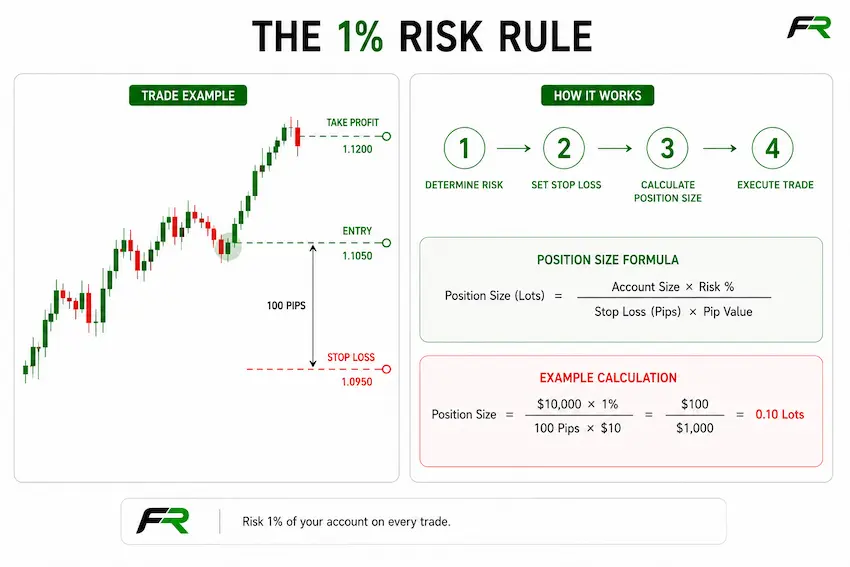
A disciplined stop-loss that cuts a losing GBP/CHF trade at 30 pips preserves capital for the next setup. A trade held without a stop because you believed it would recover can wipe out multiple winning trades in a single session. The broker’s execution quality affects how accurately that stop gets filled — which is one of the reasons integration depth matters in fast-moving markets.
The Bank for International Settlements reports that daily global forex turnover exceeded $7.5 trillion in its most recent triennial survey. That volume means deep liquidity for major pairs, but it also means price can move significantly faster than many retail traders expect, particularly around economic data releases and central bank decisions.
TradingView Subscriptions and What They Affect
TradingView has a free tier and several paid tiers: Essential, Plus, Premium, and Ultimate. The tier you use affects what you can do with broker integration, particularly around alerts and automation.
The free tier limits you to one active alert at a time. Running automated strategies via webhooks requires a paid subscription because webhook alerts need at least the Essential plan. Premium and Ultimate plans increase alert limits significantly and add features like multiple chart layouts and faster data refresh, which matter if you run setups across multiple instruments simultaneously.
Paying for TradingView’s platform is separate from your broker fees. Budget for both if you plan to use TradingView seriously as your primary charting environment. For most active forex traders, the Plus or Premium tier is the practical starting point for anything beyond basic manual analysis.
How FX Recap Tests and Rates Brokers
Every broker reviewed on FX Recap goes through a consistent evaluation process. We open real accounts, fund them with actual capital, and execute trades manually through TradingView’s broker panel where integration is available. For brokers without native TradingView execution, we test direct platform execution and note the gap clearly.
Our assessment covers six areas: TradingView integration quality, trading fees and spread transparency, order execution speed and accuracy, regulatory standing and client fund protection, account setup process and support quality, and available instruments. Each broker review includes the underlying data, not just the headline score.
We also cross-check broker-published spread and fee data against our own live test results. Where a gap exists between advertised pricing and what we experience during execution, we flag it. Traders deserve numbers that reflect real conditions, not marketing best-case figures.
FAQs
Can I trade directly from TradingView without a broker?
No. TradingView is a charting and analysis platform. Executing actual trades requires a funded account with a supported broker connected through TradingView’s broker panel or via webhook automation.
Does TradingView charge trading fees?
TradingView itself does not charge commissions or spreads on trades. All trading costs come from your connected broker. TradingView charges for its own platform subscription as a separate fee.
Are all TradingView brokers regulated?
Not automatically. TradingView has a partner broker program, but appearing in TradingView’s broker list does not certify a broker’s regulatory status. Always verify which regulator licenses the broker and check the regulator’s public register before depositing funds.
What is Pine Script and does it execute live trades?
Pine Script is TradingView’s proprietary scripting language for building indicators and strategies. On its own, Pine Script runs simulations within TradingView’s broker emulator. It does not place live orders directly. Live execution requires either a native broker panel connection or an external webhook-to-broker automation setup.
Which TradingView broker has the lowest spreads for forex?
Pepperstone’s Razor account offers spreads from 0.0 pips on major pairs with a $7 round-trip commission per standard lot. FOREX.com’s RAW pricing account offers tighter spreads with a $7 per $100k commission; the standard spread-only account carries variable spreads typically around 1.0-1.2 pips on EUR/USD. The lowest effective cost depends on your trade size and frequency. Always calculate the total round-trip cost including commission rather than comparing raw spread figures alone.
Can I trade US stocks through TradingView?
Yes, through brokers like Interactive Brokers and Tastytrade, which support US equity trading via TradingView’s panel. Brokers focused solely on forex and CFDs, such as OANDA and Pepperstone, do not offer stock trading.
Do I need a paid TradingView subscription to trade through it?
A free TradingView account lets you connect a broker and trade manually. Paid subscriptions become necessary if you want to run multiple alerts, use webhooks for automated execution, or work with multiple chart layouts simultaneously. The Essential plan is the minimum for webhook-based automation.
The FX Recap Summary
The difference between a broker that integrates properly with TradingView and one that merely claims to is clear the moment you try to execute a trade during a news release or in low-liquidity conditions. Execution speed, fill accuracy, and real-time spread transparency are things you can only evaluate by testing, not by reading a broker’s marketing material.
From our testing, Interactive Brokers leads for professional traders who want genuine multi-asset access and reliable TradingView execution. Pepperstone leads for forex and CFD traders who want the tightest spreads with native chart trading. OANDA remains the cleanest choice for straightforward forex execution with strong regulatory standing. Capital.com suits traders building their first live account who want a regulated broker with a low entry point.
Start with a demo account at one or two brokers from this list. Watch the spreads during major trading sessions, test order placement through TradingView’s panel, and verify that fills match what you expected. A broker earns your real capital after it earns your trust.
- 1
 IC MarketsTop pick★★★★★★★★★★4.7/5
 - 2
 Exness★★★★★★★★★★4.7/5
 - 3
 XM★★★★★★★★★★4.7/5
 - 4
 RoboForex★★★★★★★★★★4.6/5
 - 5
 FP Markets★★★★★★★★★★4.6/5
Your capital is at risk. FX Recap rates brokers available in each country on regulation, trading conditions and user trust. How we rank
 Unlimited cashback on your XM tradesUnlimited XM cashbackAdT&Cs apply. Your capital is at risk.T&Cs apply · Capital at riskStart earning