IC Markets





























Investor Password vs Master Password in MT4 and MT5
The master password trades; the investor password only watches. Here is when to use each, how to change them and the scams that target traders who mix them up.
 WriterAbir KhanWriterWrites the guides · checks every figure against primary sources View profileAbout Abir →
 Market analysisTanbir Habib RiyadForex & Crypto AnalystForex and crypto analyst · technical and fundamental analysis View profileAbout Tanbir →
 Fact-checking & riskJannatul FerdaushFact-Checker & Risk AnalystFact-checks every figure · risk analysis · Applied Statistics, University of Dhaka View profileAbout Jannatul →
 Trading reviewJowel RanaCo-Founder & Forex TraderCo-founder · forex trader · reviews guides from a trader's view View profileAbout Jowel →
 Final approvalRanjan NiskrityFounder, Owner & Forex TraderFounder and owner · forex trader · signs off every guide View profileAbout Ranjan →
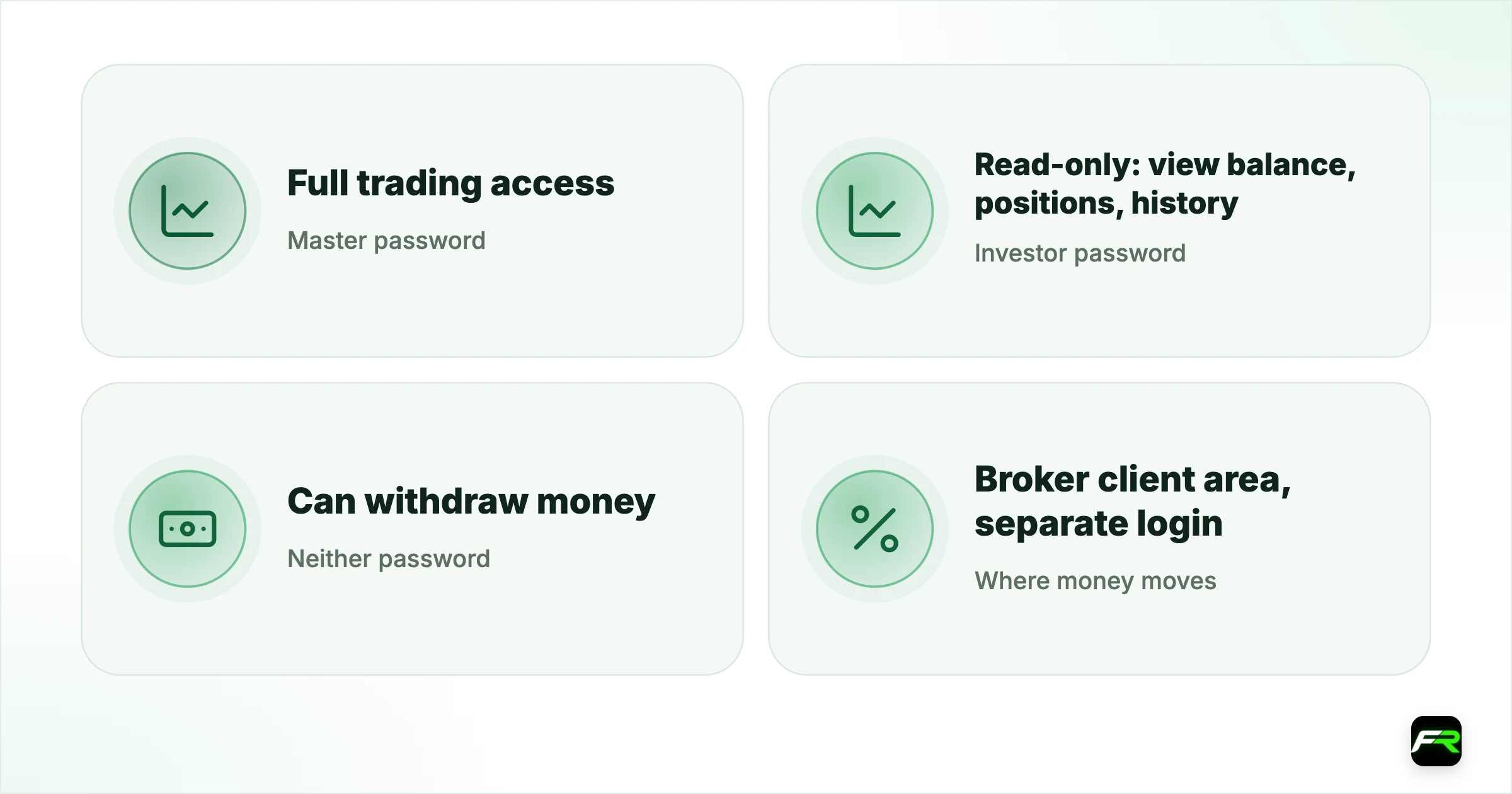
Every MetaTrader 4 and MetaTrader 5 account has two passwords. The master password gives full access: trading, closing positions and changing orders. By contrast, the investor password gives read-only access: someone logged in with it sees balances, positions and history but cannot trade. Neither password moves money; deposits and withdrawals happen in your broker's client area, which has its own login.
Keeping the two apart protects your account. You can share the investor password to show results to a mentor, a prop firm or a journal app, while keeping trading control to yourself.
| Master password | Full trading access |
|---|---|
| Investor password | Read-only: view balance, positions, history |
| Neither password | Can withdraw money |
| Where money moves | Broker client area, separate login |
| Safe to share | Investor password only |
What each password allows
| Action | Master password | Investor password |
|---|---|---|
| View balance, equity and positions | Yes | Yes, read-only |
| View trade history and reports | Full history | All of it, read-only |
| Open, close or modify trades | Allowed | Blocked |
| Run Expert Advisors that trade | Yes, with Algo Trading on | No |
| Change the account passwords | Allowed | Blocked |
| Deposit or withdraw funds | No (client area only) | Never |
When to share the investor password
- Showing a live track record to a mentor or community without risk.
- Connecting a journal or analytics service that only needs to read trades.
- Letting an accountant or tax adviser review activity.
- Proving results for a job application or a fund allocation.
Even read-only access shows your balance and every trade, so share it only with people and services you trust, and change it afterwards if needed.
How to change your passwords
On desktop MT5, right-click your account in the Navigator and choose Change password, or use the Tools menu, then Options and the Server tab. Enter the current master password, choose whether to change the master or the investor password, and set the new one. MT4 uses Tools, Options, Server, Change. Some brokers also let you reset both from the client area, which is the route to use if you have forgotten the master password.
Use long, unique passwords for each. A password manager makes this easy, and keeps you from saving the investor password in the login box by mistake, which is the most common reason the trade buttons turn grey. Our guide to the greyed-out New Order button covers that case.
Scams that misuse these passwords
Account managers and signal sellers on Telegram and WhatsApp often ask for your master password so they can "trade for you". Once they have it, they can open huge positions, run the account into a stop out, or trade against your account from one of their own. Because they never withdraw, some victims do not realise the risk until the balance is gone.
Never give anyone your master password, and never give your client-area login to anyone at all. Regulators in many countries warn about unlicensed account management. Our guide to Telegram and WhatsApp scams shows the patterns.
A trader in Lagos is offered a "managed account" on WhatsApp that promises 20% a month. The manager asks for the MT5 login and master password. Instead, the trader sends only the investor password and asks for the manager's own track record. At that point the manager refuses and disappears, which is the usual response when the offer is not genuine.
Passwords on VPS and journal services
When you set up MT5 on a VPS to run an EA, it needs the master password, because the EA must trade. Keep that VPS login private and protected with its own strong password. For journal and analytics services, which only read trades, the investor password is enough; a service that insists on the master password is a warning sign.
Prop firms often ask for the investor password of a personal account to verify experience, and some signal marketplaces ask for it to show live results. Sharing it in those cases is reasonable, since it cannot trade. Change it once the purpose is finished.
Forgotten passwords
If you forget the master password, the terminal cannot recover it. Use the client area's password reset for the trading account, or contact support, who will verify your identity before issuing a new one. A forgotten investor password is simpler: log in with the master password and set a new investor password from the terminal. Never accept a reset sent from an unknown email address or a link in a chat message.
Two passwords, two logins
It helps to keep three credentials separate in your head. The MetaTrader master password trades. Its investor password only watches. Your client-area login, usually your email and its own password, controls money, documents and account settings. A leak of the investor password is a privacy issue; a leak of the master password is a trading risk; a leak of the client-area login is a money risk. Protect them in that order of importance, from the client area down.
Brokers that offer two-factor authentication usually apply it to the client area, where withdrawals happen. Turn it on. Some also send an email or SMS each time a MetaTrader login connects from a new device, which is worth enabling if available.
If you think someone has your master password
- Change the master password immediately from the terminal or client area.
- Reset the investor password too, so old shared access ends.
- Update your client-area password and turn on two-factor authentication if offered.
- Check the History tab for trades you did not place, and report them to the broker.
Use a different password for the broker's client area than for MetaTrader. If one leaks, the other still protects your money.
No legitimate broker or regulator will ask for your master password by phone, email or chat. Treat any request as an attempted scam.
Frequently asked
What is an investor password in MT4?
It is a read-only password for your MetaTrader account. Anyone logged in with it can see your balance, open positions and history, but cannot open, close or change trades. It is designed for sharing results safely with others.
Can someone withdraw money with my master password?
Not through MetaTrader, which has no withdrawal function. Withdrawals happen in the broker's client area with a separate login. But a master password lets someone trade your account, which can lose the whole balance, so keep it private.
How do I change the investor password in MT5?
Right-click your account in the Navigator and choose Change password, or go to Tools, Options, Server. Enter the master password, select the investor password option and set a new one. Some brokers also allow resets from the client area.
Why can I see my account but not trade?
You probably logged in with the investor password, which is read-only. Log in again with the master password from your broker's welcome email, and save it correctly so the platform does not reuse the wrong one.
Is it safe to give a journal app my investor password?
Generally yes, because it cannot trade or withdraw. It does reveal your balance and every trade, so use services with a clear privacy policy, and change the investor password if you stop using the service.
What should I do if I shared my master password?
Change it immediately, along with the investor password and your client-area password. Check your history for trades you did not make and report them to the broker. Turn on two-factor authentication in the client area if available.
Official sources: MetaTrader 5 Help
Related reading
The team behind this guide
Researched, checked and approved by five forex specialists
Every guide is written, fact-checked and edited before it goes live, and updated when the facts change. Spotted an error? Tell us.