 IC Markets




































Exness Demo Account
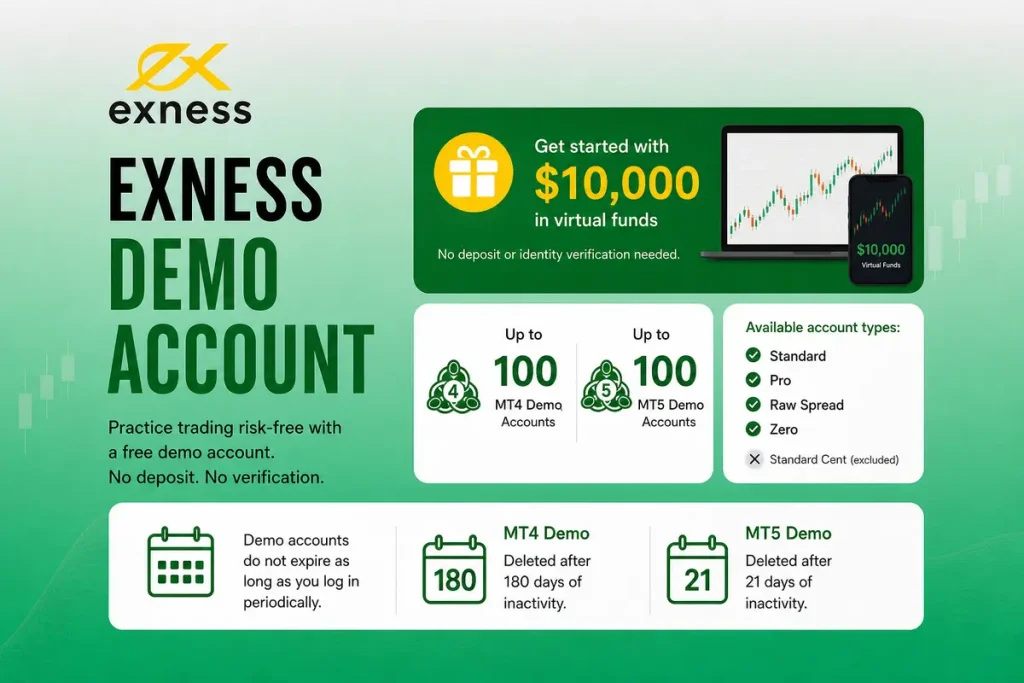
Exness creates a free demo account for you when you register: a Standard MT5 demo with $10,000 in virtual funds by default. You can open more demo accounts for every account type except Standard Cent, set the virtual balance yourself, and trade without a deposit. MetaTrader demo accounts are deleted after a period of inactivity, so log in and trade regularly to keep them.
 WriterAbir KhanWriterWrites the guides · checks every figure against primary sources View profileAbout Abir →
 Market analysisTanbir Habib RiyadForex & Crypto AnalystForex and crypto analyst · technical and fundamental analysis View profileAbout Tanbir →
 Fact-checking & riskJannatul FerdaushFact-Checker & Risk AnalystFact-checks every figure · risk analysis · Applied Statistics, University of Dhaka View profileAbout Jannatul →
 Trading reviewJowel RanaCo-Founder & Forex TraderCo-founder · forex trader · reviews guides from a trader's view View profileAbout Jowel →
 Final approvalRanjan NiskrityFounder, Owner & Forex TraderFounder and owner · forex trader · signs off every guide View profileAbout Ranjan →
A demo account is a practice trading environment that uses virtual money instead of real funds. Exness says trading conditions on demo accounts are the same as on real accounts, which makes them useful for practising strategies. The main difference is that nothing you win or lose is real.
When you register on Exness, two trading accounts are created in your Personal Area automatically: a real Standard MT5 account and a demo Standard MT5 account, with $10,000 in virtual funds by default.
You can also create more demo accounts to test other account types or strategies: demos are available for every account type except Standard Cent. For a full comparison of each type, see our Exness account types guide.
Why Use a Demo Before Going Live?
Many beginners move to live trading quickly without much practice. Practising on a demo account first can help you build confidence, and even experienced traders returning after a break can benefit from a few days of demo practice. Here is what a demo account helps you do.
Learn MT4 or MT5 before trading with real money. Both platforms have many features, order types and charting tools. A demo lets you learn where everything is and how execution feels before money is on the line.
Test your strategy over a larger sample of trades. Run a new approach for 30, 50 or 100 trades on demo to see whether it produces consistent results, and collect performance data without risking real money.
Compare account types. Exness lets you open demos of Standard, Pro, Raw Spread and Zero accounts, so you can compare how spreads, commissions and execution differ before choosing a live account.
Build trading discipline. Trading real money brings emotions that are hard to feel on demo, but building a disciplined routine first (consistent lot sizing, a stop loss on every trade, a trading journal) makes the move to live trading easier.
How to Open an Exness Demo Account
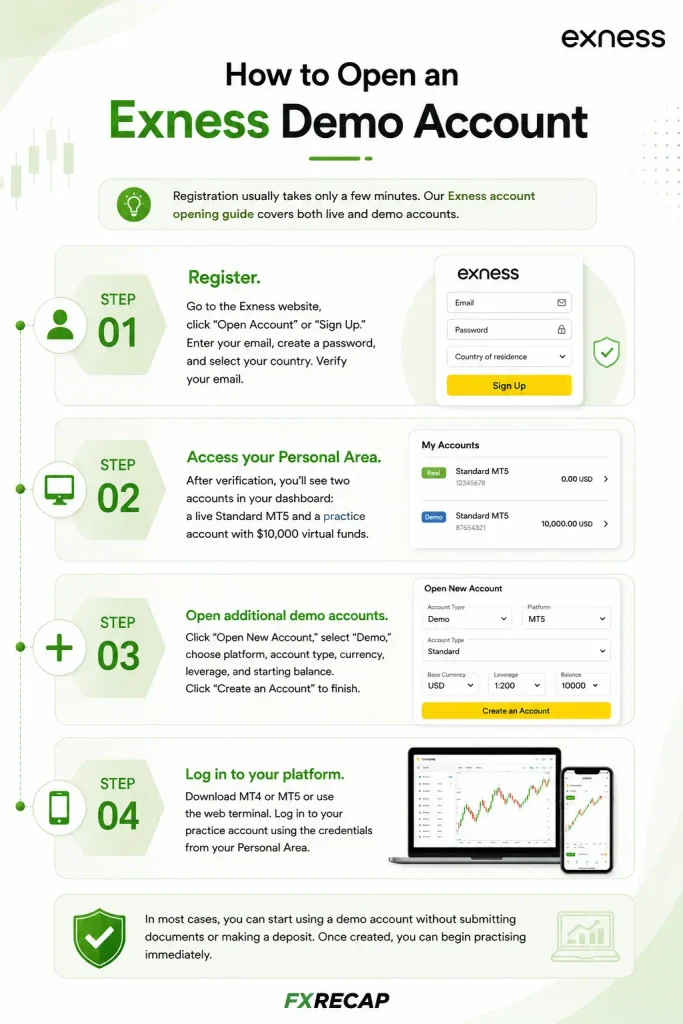
Registration usually takes only a few minutes. For a complete walkthrough, including live accounts, see our Exness account opening guide.
Step 1: Register. Go to the Exness website, register with your email address and a password, and choose your country of residence.
Step 2: Find your demo account. Your Personal Area already contains a real Standard MT5 account and a demo Standard MT5 account with $10,000 in virtual funds.
Step 3: Open more demo accounts (optional). In My Accounts, select Open Account, choose the account type, then choose Demo. Set the currency, a nickname, the maximum leverage and the platform (MT4 or MT5); on the Pro account you also choose the execution type. MetaTrader accounts need a trading password. Then click Create an Account. You can also create demo accounts in the Exness Trade app.
Step 4: Start trading. Log in to MT4 or MT5 with the login and server shown in your Personal Area, or trade MT5 demo accounts in the Exness Terminal or the Exness Trade app.
You do not need to make a deposit to use a demo account, and Exness does not charge any fee for creating trading accounts.
What You Can Customize on a Demo Account
Exness lets you choose several settings when you create a demo account, and change some of them later.
| Setting | Options | Can Change Later? |
| Account type | Standard, Pro, Raw Spread, Zero | No (create a new demo) |
| Platform | MT4 or MT5 | No (create a new demo) |
| Currency | Chosen when you create the account | No (create a new demo) |
| Leverage | 1:2 up to 1:Unlimited | Yes, from your Personal Area |
| Virtual balance | $10,000 by default on the first demo | Yes, with Set Balance |
You can set the virtual balance lower or higher than it is now, in the demo account’s currency: in My Accounts, open the Demo tab and click Set Balance. Setting it close to what you plan to deposit in a live account makes your practice more realistic.
Account Limits and Expiry Rules
Number of demos: Exness allows up to 100 demo MT4 accounts and 100 demo MT5 accounts in one Personal Area.
Inactivity: Demo accounts on MT4 and MT5 are deleted if there is no activity, and they cannot be restored afterwards. Exness defines activity as trading or balance operations. It does not publish a fixed number of days, and it says accounts can occasionally be deleted sooner for technical reasons, so log in and trade regularly if you are running long-term tests or Expert Advisors.
Standard Cent exclusion: Demos are available for Standard, Pro, Raw Spread and Zero accounts. Standard Cent is only available as a real account; a Standard demo with a small virtual balance is the closest alternative.
Which Platforms Support Demo Trading?
MetaTrader 4 (MT4): Offers 9 timeframes, 30 built-in indicators and automated trading through Expert Advisors, according to its developer MetaQuotes.
MetaTrader 5 (MT5): Adds 21 timeframes, 38 built-in indicators and a built-in economic calendar, according to MetaQuotes. The demo account Exness creates at registration is an MT5 account.
Exness Terminal (web): Exness’s browser platform, with 100+ indicators, 50 drawing tools and up to eight charts per workspace; it works with MT5 accounts.
Exness Trade app (mobile): Available on iOS and Android for MT5 accounts, with charts, price alerts, and deposits and withdrawals for real accounts. You can create demo accounts and switch between demo and real accounts in the app.
How Demo Differs from Live Trading
Exness says demo conditions match its real accounts, but trading with virtual money is still different in a few practical ways.
Emotional impact. Losing virtual funds feels very different from losing your own money. Many traders do well on demo and struggle on live accounts because the pressure of real losses changes their decisions. Treat demo money as if it were real: follow your risk plan, use the position size you would use live, and keep a trading journal.
Fills and slippage. On a live account, orders can fill at a slightly different price than you expected when markets move fast, especially around news. Treat demo results as a best case for execution.
Position size. Very large orders can behave differently live, depending on market liquidity. For most individual traders this matters less than discipline and cost.
How to Use a Demo Account Effectively
Some traders click buttons without a plan, open huge positions and move to live trading after a few winning streaks. That wastes most of what a demo can teach. Here are practical ways to use it better.
Match your real setup. Set the demo balance to the amount you plan to deposit. If you intend to start live with $200, practise with $200; trading $10,000 of virtual money teaches you little about managing a small account.
Use the account type you plan to trade live. If you will open a Raw Spread account for scalping, practise on a Raw Spread demo; a Standard demo has a different cost structure. See our Exness spreads guide for the cost differences.
Set a minimum trade count before going live. Pick a number, such as 50 or 100 trades, and stick to it. Review your win rate, average risk-to-reward and largest drawdown over that sample, and keep practising if the results are not positive.
Use stop losses and take profits on every trade. This habit should be automatic before real money is at risk. Gold and other volatile instruments can move against you fast enough to wipe out an unprotected position.
Test different sessions. Trade during the Asian, London and New York sessions to see how your strategy copes with changing volatility and liquidity. If you plan to trade gold, watch the periods when two major sessions overlap, as volatility often rises.
When to Move from Demo to Live
There is no fixed timeframe. Some traders are ready after two weeks, others need two months. Your results matter more than the time you have spent practising.
As a guide, consider moving to live trading when your demo results are positive over a meaningful number of trades, your maximum drawdown stays within what a real account could handle, you follow your risk rules consistently, and you can explain your approach clearly.
When you do, start small. Standard accounts need only the payment method’s minimum deposit, while Professional accounts need at least $200 depending on region; see our Exness minimum deposit guide. Increase your capital only when your live results confirm what the demo showed.
Features Worth Knowing About
Expert Advisors (EAs) on Demo
MT4 and MT5 demo accounts run Expert Advisors in the same way as real accounts, so a demo is a sensible place to test a new trading robot before letting it manage real money.
Swap-Free Demo
Swap-free status is set for your whole Personal Area and covers a list of instruments, so check which instruments are swap-free before relying on a demo to model overnight costs. See our swap-free (Islamic) account guide.
Leverage Testing
On demo accounts, the unlimited leverage option can be selected at any time, without the trading-history conditions that apply to real accounts. It only applies while demo equity is below $5,000; above that, leverage follows the normal equity limits. For details on who qualifies on real accounts, read our Exness unlimited leverage guide.
Copy Trading
Exness closed its Copy Trading service on 25 June 2026, when all existing strategies and investments were closed, so it is no longer an option on demo or real accounts. Learn more in our Exness social trading guide.
Frequently Asked Questions
Is the Exness demo account free?
Yes. It is free to open and use, and no deposit is needed.
How much virtual money do I get?
The demo account created at registration has $10,000 by default. You can set a higher or lower balance at any time with Set Balance in your Personal Area.
Does the demo account expire?
Not on a fixed date, but MT4 and MT5 demo accounts are deleted after a period of inactivity and cannot be restored. Exness does not publish the exact number of days, so log in and trade regularly.
Can I have multiple demo accounts?
Yes. Exness allows up to 100 demo MT4 accounts and 100 demo MT5 accounts in one Personal Area.
Is the Standard Cent account available as a demo?
No. Standard Cent is the only account type without a demo version. Standard, Pro, Raw Spread and Zero all have demos.
Can I withdraw profits from a demo?
No. Demo accounts use virtual funds, so no real money is deposited or withdrawn.
Do demo and live accounts show the same spreads?
Exness says demo trading conditions are the same as on real accounts. What demo can’t reproduce is how you trade under real pressure, and fills during fast markets can differ.
How fast can I switch from demo to live?
Straight away. Your Personal Area already has a real Standard MT5 account next to your demo. Fund it through one of the deposit methods available in your country; methods, limits and processing times are shown in your Personal Area.
Is Exness a well-regulated broker?
Exness’s group companies hold licences from 11 regulators, including the FSA (Seychelles), FSCA (South Africa) and CMA (Kenya); its FCA and CySEC companies do not serve retail clients. We analyze what this means for fund safety in our is Exness legit review.
Final Word
A demo account lets you practise without financial risk. Exness makes it easy to set up, creates one for you at registration, and lets you run many demos at once. The traders who get the most out of it use it seriously: they match the demo to their planned live setup, keep their accounts active, and track their results as if real money were on the line. For a broader look at the broker, see our full Exness review.
The team behind this guide
Researched, checked and approved by five forex specialists
Every guide is written, fact-checked and edited before it goes live, and updated when the facts change. Spotted an error? Tell us.
Related Articles
 Brokers
15 min read
Brokers
15 min read

 Brokers
9 min read
Brokers
9 min read
 Brokers
9 min read
Brokers
9 min read
 Brokers
10 min read
Brokers
10 min read
 Brokers
10 min read
Brokers
10 min read
 Brokers
11 min read
Brokers
11 min read