 IC Markets




































XM Demo Account
XM gives every registered user a free demo account: your first Real and Demo accounts are created automatically when you register, and you set the virtual balance yourself with the Set Balance option. Demo accounts come in Standard and Ultra Low Standard types. You can hold up to 5 active demo accounts at the same time. A demo can be used for as long as you like, but it is closed automatically after more than 60 days of inactivity, and you can open a new one at any time.
 WriterAbir KhanWriterWrites the guides · checks every figure against primary sources View profileAbout Abir →
 Market analysisTanbir Habib RiyadForex & Crypto AnalystForex and crypto analyst · technical and fundamental analysis View profileAbout Tanbir →
 Fact-checking & riskJannatul FerdaushFact-Checker & Risk AnalystFact-checks every figure · risk analysis · Applied Statistics, University of Dhaka View profileAbout Jannatul →
 Trading reviewJowel RanaCo-Founder & Forex TraderCo-founder · forex trader · reviews guides from a trader's view View profileAbout Jowel →
 Final approvalRanjan NiskrityFounder, Owner & Forex TraderFounder and owner · forex trader · signs off every guide View profileAbout Ranjan →
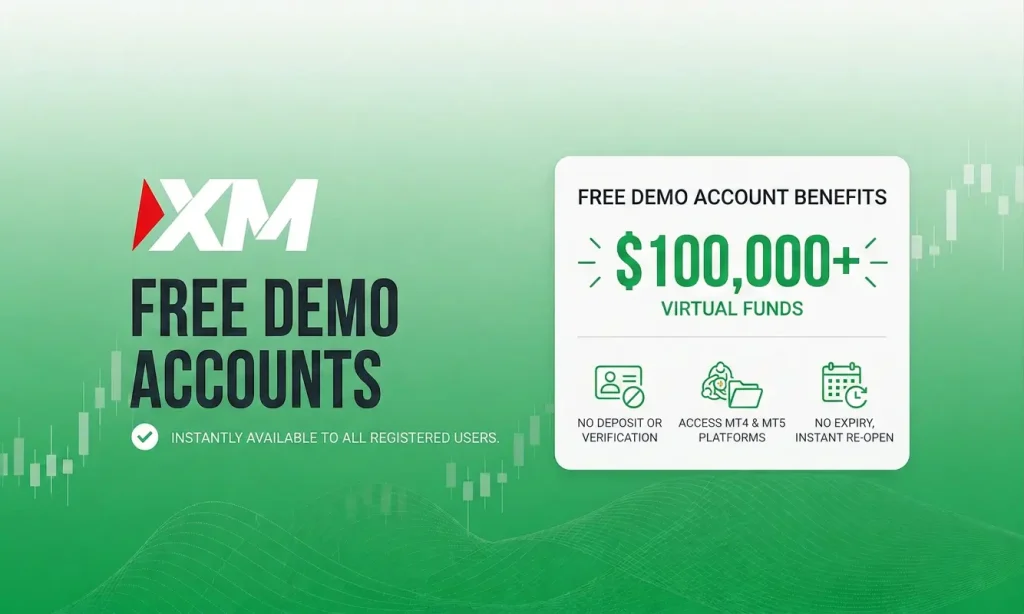
XM says opening an account takes only a few minutes, and your first demo account is created automatically when you register. No deposit is needed. But there is one setting on the form that most beginners get wrong, and getting it wrong makes the whole exercise close to useless. Here is the full walkthrough.
It takes a few minutes. You register an XM profile and XM opens your first demo account for you. No deposit is needed. XM gives you virtual money and you trade real market prices with it.
One setting matters more than all the others: the virtual balance. XM lets you set it yourself. Set it to the amount you would really put into a live account, whether that is $50 or $200. Practising with $100,000 when you plan to deposit $100 teaches you nothing useful, and that mistake is the reason most demo practice does not carry over.
Three things worth knowing before you start.
It expires if you ignore it. XM closes a demo account automatically after more than 60 days of inactivity. Log in now and then, or you will lose it and have to start again.
You can open several. Up to five active demo accounts at the same time, so you can test different settings side by side.
It will not teach you the hardest part. Demo trading has no fear in it. That gap is covered further down, and it is the most honest thing on this page.
What You Need Before You Start
Not much, which is the point.
| You need | You do not need |
|---|---|
| An email address you can open | Any deposit |
| A password for your XM profile | A funded live account |
| A few minutes | Card or bank details |
| A rough idea of what you would deposit for real | Any trading knowledge |
Why Use a Demo Before Going Live?
Most new traders skip the demo and go straight to live trading. That is almost always a mistake. Even experienced traders returning after a break benefit from a few days of demo practice. Here is what a demo actually gives you.
Platform familiarity. MT4 and MT5 have dozens of features, order types, timeframes, and charting tools. The demo lets you learn where everything is and how execution feels before money is involved.
Account type comparison. XM offers Standard and Ultra Low Standard as demo account types. You can directly compare how spreads and costs differ between them before deciding which to use live.
Strategy testing. Run a new strategy for 50 or 100 trades under real market conditions. Track your win rate, average risk-to-reward, and largest drawdown. This kind of data is impossible to collect on a live account without risk.
Leverage experimentation. XM says a demo account has all the same features and functionality as a real account, so you can test how different leverage levels affect your margin requirements and position sizing before committing real capital.
EA and indicator testing. Because the demo works like a real account, you can run Expert Advisors and custom indicators on MetaTrader and see how they behave with zero financial risk.
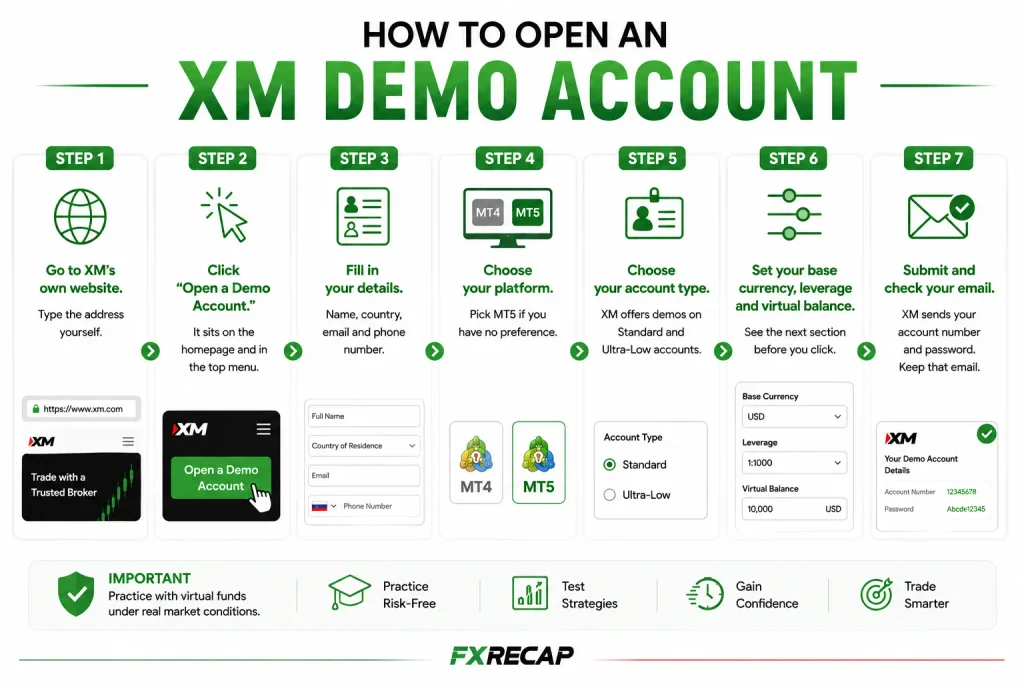
How to Open an XM Demo Account
Step 1. Go to XM’s own website. Type the address yourself rather than clicking a link from a search result or an advert. There are copycat sites, and this is the one moment to be careful.
Step 2. Register your XM profile. Click “Get Started” and complete the registration form.
Step 3. Fill in your details. Name, country of residence, email address and phone number. Your country decides which XM company holds your account, and that changes your leverage limits, so answer it honestly.
Step 4. Find your demo account. XM opens your first Real and Demo trading accounts automatically just after you register, and you log in to them with your XM profile password. Click your account balance at the top of the screen to see your account numbers and trading servers.
Step 5. Choose your account type. XM offers demos on its Standard and Ultra Low Standard accounts (there is no Micro demo). For an additional demo, choose Demo, complete the form and pick the one you would open for real, so your practice matches your plan.
Step 6. Set your virtual balance. Select the demo account, click “Set Balance”, enter an amount and save. See the next section before you choose.
Step 7. Keep it active. Log in now and then. XM closes a demo automatically after more than 60 days of inactivity, and you can hold up to 5 active demos at the same time.
The One Setting Most People Get Wrong
XM lets you choose your demo balance yourself with its Set Balance option.
Choose it carefully.
Here is why. Trading $100,000 of pretend money is nothing like trading $200 of your own. With $100,000 you can open a position that would be reckless on a real account and barely notice. You learn habits that will empty a live account in a week. Position sizing, the skill of choosing how big a trade to place, is one of the few things demo can genuinely teach you, and a fake $100,000 balance stops it teaching you anything.
So set the balance to what you would really deposit. If that is $100, set $100. If it is $200, set $200. It will feel small and uncomfortable. That discomfort is the lesson.
On leverage, the same idea. XM will offer you very high leverage. Choose the level you would use for real, and if you do not know, choose low. Leverage grows your losses exactly as fast as your wins, and practising at 1:1000 teaches you a habit that will hurt you.
You can change the balance later the same way: select the account, click “Set Balance” and save.
How to Log In to MT4 or MT5
Download MT4 or MT5 from XM’s site, or use the XM app on your phone.
On a computer, open the platform, click File, then Login to Trade Account. Type your account number and password, and pick the trading server shown in your XM account. That server name matters. If the login fails, it is usually the wrong server rather than the wrong password.
In the XM App, log in with your XM profile email and password, and all your trading accounts are there in one place.
If you have forgotten a trading account password, XM’s Help Center says you can reset it from your XM account: click your account balance, then Manage > Change Trading Account Password.
What a Demo Account Will Not Teach You
This is the part most guides leave out, and it is the part that matters.
It will not teach you fear. This is the big one. When your own money is on the line, you close winning trades too early because you are scared to lose the profit, and you hold losing trades too long because closing them makes the loss real. None of that happens with pretend money. Traders who are calm and disciplined on demo often fall apart in their first live week, and they are surprised every time. Nothing about demo prepares you for it.
It will not fully match live conditions. You will read that demo pricing is identical to live. Treat that carefully. Demo fills tend to be cleaner than real ones, and you do not feel slippage, which is when your order fills at a slightly worse price than you asked for, usually during news. Real trading is a little messier than the practice version.
It will not tell you whether you are any good. A profitable month on demo means less than you think, because the emotional half of trading was switched off.
So what is demo for? Three things, and they are worth doing properly.
Learning where the buttons are, so you do not fumble an order with real money. Testing whether a strategy makes sense before you fund anything. And practising position sizing, but only if you set that balance realistically, which is why the section above matters so much.
Use it for those. Do not use it to convince yourself you are ready.
When Your Demo Expires
XM closes a demo account automatically if it stays inactive for more than 60 days, according to its Help Center. You can use a demo for as long as you like as long as you keep it active.
If yours closes, nothing is lost beyond the practice history. You can open a new demo account at any time.
You can hold up to five active demo accounts at the same time, which is genuinely useful. Run one at your real intended balance and another to test a strategy you are not sure about, and keep them separate.
When to Move to Live
There is no clean rule, but there is a decent one.
Move when you can follow your own plan on demo for a few weeks without breaking it. Not when you are profitable. Following the plan is the skill. Profit on pretend money is mostly luck plus a fake balance.
When you do move, start smaller than feels sensible. Whatever you practised with, the first live week is a different sport, because now it hurts. Expect to trade worse than you did on demo. Everyone does.
FAQ
Is the XM demo account free? Yes. No deposit is needed, and XM opens your first demo account automatically when you register.
How long does it take to open? XM says opening an account takes only a few minutes.
How much virtual money do I get? You choose: select the demo account, click “Set Balance” and enter an amount. Set it to what you would really deposit instead, because a fake $100,000 balance teaches bad habits.
Does the XM demo account expire? Only if you leave it unused: XM closes a demo automatically after more than 60 days of inactivity. Log in occasionally and it stays open. If it closes, just open another.
How many demo accounts can I have? Up to five active demo accounts at the same time, so you can test different settings side by side.
Can I change my demo password? XM’s Help Center says you can reset a trading account password from your XM account: click your account balance, then Manage > Change Trading Account Password.
Is demo trading the same as real trading? No, and this is the important one. The prices are real but the pressure is not. You feel no fear with pretend money, and fear is what changes how people trade. Expect your first live week to go worse than your demo.
Should I use MT4 or MT5? MT5, unless you have a specific tool that needs MT4. It is newer and does everything MT4 does.
The team behind this guide
Researched, checked and approved by five forex specialists
Every guide is written, fact-checked and edited before it goes live, and updated when the facts change. Spotted an error? Tell us.
Related Articles
 Brokers
10 min read
Brokers
10 min read

 Brokers
14 min read
Brokers
14 min read
 Brokers
10 min read
Brokers
10 min read
 Brokers
13 min read
Brokers
13 min read
 Brokers
15 min read
Brokers
15 min read
 Brokers
9 min read
Brokers
9 min read