 IC Markets




































XM Minimum Deposit
The XM minimum deposit is $5 for Micro, Standard and Ultra Low accounts, while the Shares Account requires a minimum of $10,000. XM charges no deposit or withdrawal fees, and it covers bank fees on international wires of $200 or more. Deposits can be made in multiple currencies, and XM automatically converts funds to your account’s base currency.
 WriterAbir KhanWriterWrites the guides · checks every figure against primary sources View profileAbout Abir →
 Market analysisTanbir Habib RiyadForex & Crypto AnalystForex and crypto analyst · technical and fundamental analysis View profileAbout Tanbir →
 Fact-checking & riskJannatul FerdaushFact-Checker & Risk AnalystFact-checks every figure · risk analysis · Applied Statistics, University of Dhaka View profileAbout Jannatul →
 Trading reviewJowel RanaCo-Founder & Forex TraderCo-founder · forex trader · reviews guides from a trader's view View profileAbout Jowel →
 Final approvalRanjan NiskrityFounder, Owner & Forex TraderFounder and owner · forex trader · signs off every guide View profileAbout Ranjan →
We know that the minimum deposit is often the first figure traders check when choosing a broker.
Let’s look at how XM structures its entry requirements.
XM keeps it at $5 for most account types, making it one of the lowest entry requirements in the industry.
However, the minimum deposit needed to open an account and the amount required to trade responsibly are two different things. In this guide, we break down the minimum deposit for each XM account type, how payment methods can affect funding requirements, any costs you should be aware of, and how much capital you may realistically need to trade effectively.
For a broader look at the broker, see our XM safety and legitimacy review.
Minimum Deposit by Account Type
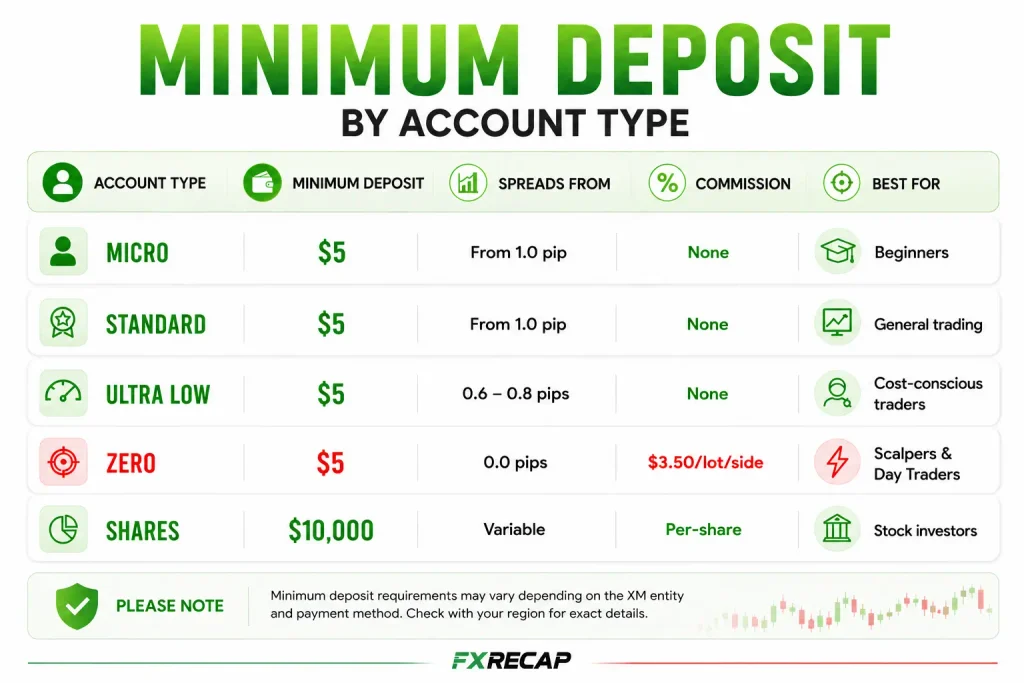
XM offers Standard (with a Micro option), Ultra Low and Shares accounts, each with a different pricing model and target audience. We cover the full feature comparison in our XM account types guide.
Here is exactly how much you need to get started with each option.
| Account | Min Deposit | EUR/USD Spreads From | Commission | Best For |
| Micro | $5 | 1.6 pips | None | Beginners |
| Standard | $5 | 1.6 pips | None | General trading, bonuses |
| Ultra Low | $5 | 0.8 pips | None | Cost-conscious traders |
| Shares | $10,000 | Variable | Yes | Stock investors |
The $5 minimum deposit applies to the Micro, Standard and Ultra Low accounts, although XM says the minimum varies by payment method.
The Shares Account falls into a separate category, requiring a minimum deposit of $10,000 and targeting traders seeking direct exposure to equities.
Payment Methods and Processing Times
| Method | XM Fees |
| Credit/Debit Cards | None |
| E-wallets | None |
| Bank Transfers | None; XM covers bank fees on international wires of $200 or more |
| Local Transfers | None |
XM supports credit and debit cards, bank transfers, local transfers and e-wallets. To see the options for your account, log in to WebTrader or the XM App and go to Funding, then Deposit.
Bank Wire Transfer Fees
XM covers all fees imposed by its bank on international wires of $200 or more (or the currency equivalent). XM notes this is subject to change.
Why Your Account’s Base Currency Selection Matters
During account setup, XM asks you to choose a base currency: the currency in which your account balance is displayed. XM says you can deposit in any currency, and deposits are automatically converted into your account’s base currency.
An easily overlooked detail: if your deposit currency does not match your base currency, an exchange rate applies, either at XM’s end or through the payment processor. XM shows the rate before you confirm a deposit or withdrawal in WebTrader or the XM App.
To avoid this cost, it is generally better to set your XM base currency to match your primary deposit and withdrawal method. For example, if your bank account is in BDT and your XM base currency is set to USD, every deposit and withdrawal will trigger a conversion.
Choosing a base currency that matches your deposits and withdrawals avoids repeated conversions.
How Much Should You Deposit?
This brings us to a crucial question: how much capital do you need?
How much should you realistically deposit?
Meeting the $5 minimum gets your account opened, but it does not provide enough flexibility for practical trading.
Below is a more realistic breakdown of what different deposit ranges typically allow.
With $5 to $20:
On a Micro account the smallest trade is 0.1 micro lots (100 units). On EUR/USD, each pip is then worth about $0.01. This is enough to test the platform, but a 50-pip adverse move would cost around $0.50, which quickly erodes a $5 balance. This range is best viewed as platform testing rather than serious trading.
With $50 to $100:
You gain more room for stop losses. At 0.01 standard lots on a Standard or Ultra Low account, each pip is worth about $0.10. A 50-pip stop loss equals roughly $5, which represents about 5–10% of the account balance in this range. This is a more practical starting point for traders who want to learn with real capital while still managing risk.
With $200 to $500:
You can trade multiple currency pairs, use wider stop losses, and apply more structured risk management (such as 1–2% per trade). At this level, the Ultra Low account’s tighter spreads (from 0.8 pips against from 1.6 on Standard for EUR/USD) can noticeably reduce trading costs, especially for frequent trading.
With $1,000+:
You can size positions more effectively, including trading standard lots on the Standard account with proper risk controls. The Ultra Low account becomes more efficient for higher-frequency strategies due to spread advantages.
Funding Your Account for the First Time
The deposit process typically takes about 2 minutes once your account is fully verified.
If your account is not yet verified, you can follow our XM account opening guide for the full setup process.
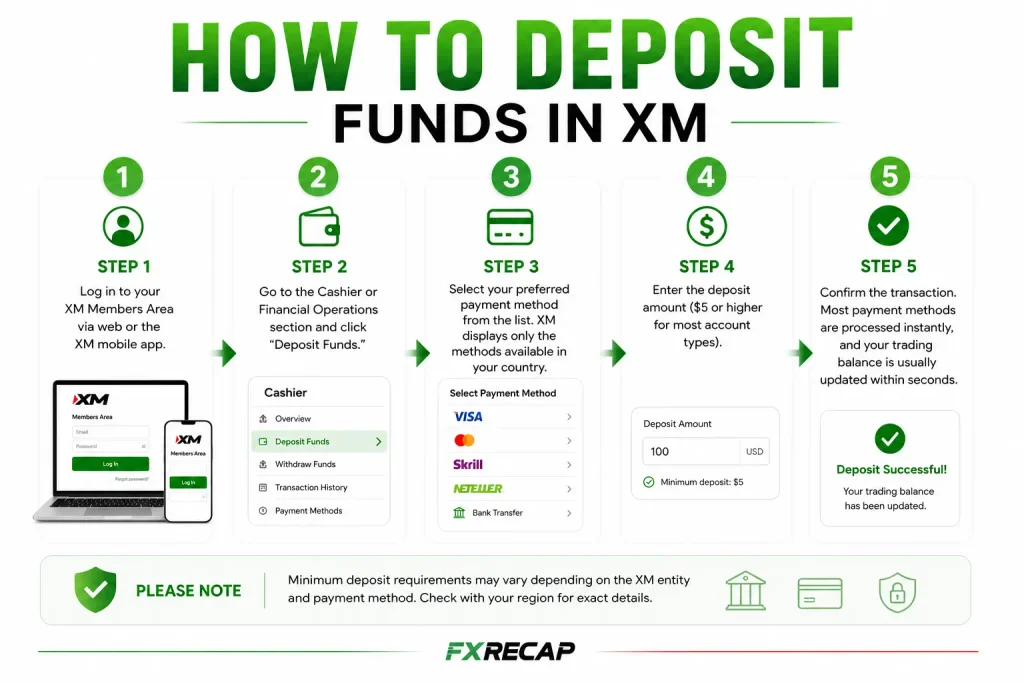
How to Deposit Funds in XM
Step 1: Log in to your XM Members Area via web or the XM mobile app.
Step 2: Go to the Cashier or Financial Operations section and click “Deposit Funds.”
Step 3: Select your preferred payment method from the list. XM displays only the methods available in your country.
Step 4: Enter the deposit amount ($5 or higher for most account types).
Step 5: Confirm the transaction. Most payment methods are processed instantly, and your trading balance is usually updated within seconds.
For withdrawals, it is recommended to use the same payment method used for deposits.
XM follows anti-money laundering (AML) regulations, meaning withdrawals are typically returned to the original deposit method up to the deposited amount. Any profits above that amount can be withdrawn through other available payment channels.
Not Ready to Deposit? Start Free
If you aren’t ready to commit real funds yet, XM offers free demo accounts preloaded with customizable virtual funds on both the MT4 and MT5 platforms. You can hold up to 5 demo accounts, and XM closes a demo account after 60 days of inactivity (you can open a new one at any time).
This lets you test your strategies under real market conditions with zero financial risk.
Our XM demo account guide explains how to set it up.
XM’s current promotions include a 50% deposit bonus up to $100, followed by further deposit bonuses of up to $5,000 a month, on eligible Standard accounts. Bonuses are for trading only and can’t be withdrawn, but profits made with them can. The Ultra Low and Shares accounts are not eligible.
Check your Members Area for eligibility.
How Leverage Relates to Your Deposit
Let’s take a look at how leverage interacts with your deposit balance.
Higher leverage increases the effective use of your deposit by reducing the margin required per trade. At 1:30 leverage (EU), a 0.01 lot EUR/USD trade requires approximately $37 in margin. At 1:1000 leverage (FSC Belize), the same trade requires roughly $1.10 in margin.
However, as the rule of risk in trading tells us, higher leverage also increases risk, as losses can accumulate much faster.
With a $5 deposit at 1:1000 leverage, it is possible to open positions that the account balance cannot realistically sustain.
For this reason, deposit sizing is more important than the official minimum requirement.
For a more detailed breakdown of leverage tiers, refer to our XM leverage guide.
The Inactivity Fee
XM charges a dormancy fee after more than 90 days with no activity (no trading, deposits, withdrawals, internal transfers, new accounts or registration activity).
A fixed dormancy fee of 10 USD is deducted monthly from your remaining balance. If your balance reaches zero, no further charges are applied. If you plan to stop trading for a while, withdraw your funds before the 90-day window triggers the fee.
Frequently Asked Questions (FAQs)
What is the minimum deposit for XM?
$5 for Micro, Standard and Ultra Low accounts. $10,000 for the Shares Account.
Does XM charge deposit fees?
No. XM charges no deposit or withdrawal fees, and it covers bank fees on international wires of $200 or more. Your bank or card issuer may charge separately.
Can I deposit in my local currency?
Yes. XM accepts deposits in any currency your payment provider supports. The amount is automatically converted to your account base currency. If the currencies differ, an exchange rate applies, which XM shows before you confirm.
Is $5 enough to trade with?
It is enough to open the account and experience the platform. For actual trading with proper risk management, $50 to $100 is a more realistic starting point. At $5, a single losing trade can consume your entire balance.
Does XM have a no-deposit bonus?
A no-deposit bonus is not among XM’s current promotions. XM currently offers a 50% deposit bonus up to $100, then further deposit bonuses of up to $5,000 a month, plus $80 per successful referral.
What payment methods does XM accept?
Credit and debit cards, bank transfers, local transfers and e-wallets. The options available depend on your country; you can see them under Funding in WebTrader or the XM App.
Can I change my base currency after opening?
XM’s help centre does not cover changing a base currency. You can open up to 10 trading accounts, so you can open a new one in the currency you need.
Is there a maximum deposit limit?
Is XM safe to deposit money with?
XM entities are licensed by CySEC, the DFSA, the FSC (Belize), the FSA (Seychelles) and the FSC (Mauritius). Client funds are held in segregated accounts with established banking institutions. We analyse what this means for your money in our XM legitimacy review.
Final Word from FX Recap
Ultimately, choosing how much to deposit comes down to your personal risk tolerance.
XM’s $5 minimum deposit is one of the lowest entry points in the industry, making it easy to start trading. However, the minimum deposit and the amount needed to trade effectively are not the same.
While $5 is enough to open an account, it offers very limited trading flexibility. A more practical starting range is $50 to $100, which allows for basic risk management and more realistic position sizing.
For beginners, a demo account is still the safest starting point. Once consistent results are achieved, transitioning to a small live deposit you can afford to lose helps bridge the gap between practice and real-market trading in a controlled way.
The team behind this guide
Researched, checked and approved by five forex specialists
Every guide is written, fact-checked and edited before it goes live, and updated when the facts change. Spotted an error? Tell us.
Related Articles
 Brokers
10 min read
Brokers
10 min read

 Brokers
12 min read
Brokers
12 min read
 Brokers
14 min read
Brokers
14 min read
 Brokers
13 min read
Brokers
13 min read
 Brokers
15 min read
Brokers
15 min read
 Brokers
9 min read
Brokers
9 min read