

 EUR/USD
  GBP/USD
  USD/ZAR
  EUR/INR
  EUR/GBP
  XAU/USD (Gold)
  XAG/USD (Silver)
  XM Global
  AvaTrade
  RoboForex
  IC Markets
  LiteFinance
  IUX Markets
  FP Markets
  South Africa
  Thailand
  Singapore
  Japan
Japan  Pakistan
  Malaysia
  Philippines
  Brazil
  Bangladesh
  Vietnam
  India
India 
XM Leverage Explained
XM offers leverage up to 1:1000 for international clients registered under the IFSC (Belize) entity. EU clients under CySEC are capped at 1:30 on major forex pairs under ESMA regulation. Australian clients under ASIC face the same 1:30 cap. The leverage available to you depends on three things: which regulatory entity your account sits under, which instrument you are trading, and your account equity level. XM does not change margin requirements overnight or during weekends, which is a notable advantage over some competitors.




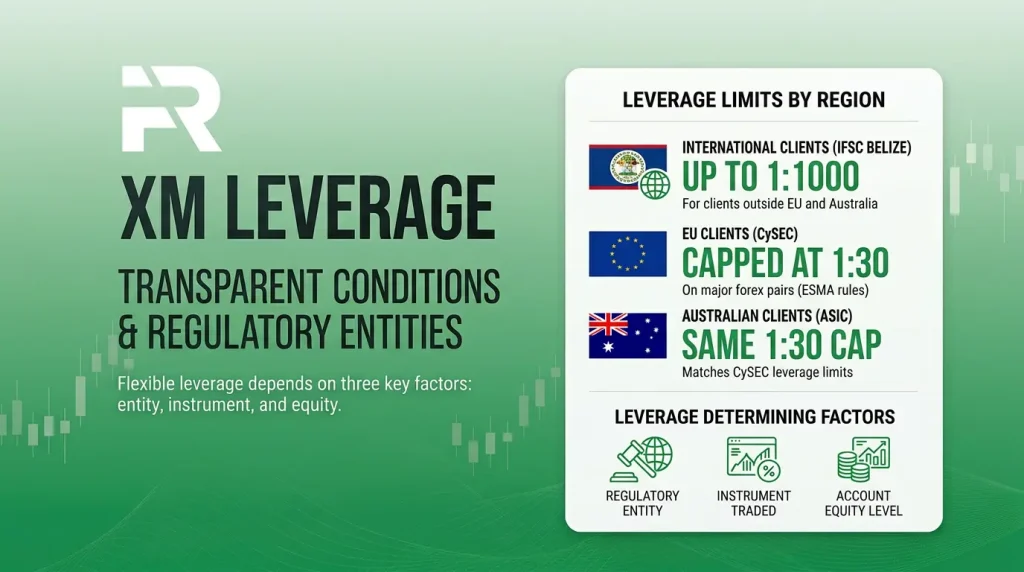
Leverage on XM is not a single number. It is a tiered system that changes based on where you live, what you trade, and how much equity your account holds. Most articles treat it as a simple “up to 1:1000” headline, but the reality is more nuanced. Getting it wrong means either underestimating your margin requirement (and facing unexpected margin calls) or overestimating your buying power (and blowing your account). Below is a complete breakdown of how leverage actually works on XM in 2026, entity by entity and instrument by instrument. For a broader look at the broker, see our XM safety and legitimacy review.
What Is Leverage and How Does It Work?
Leverage lets you control a larger position than your account balance would otherwise allow. If you have $100 in your account and trade with 1:100 leverage, you can open a position worth $10,000. The $100 is your margin (the collateral held by the broker), and the remaining $9,900 is effectively borrowed from XM.
The profit or loss you make is calculated on the full $10,000 position, not just your $100 margin. If the trade moves 1% in your favor, you earn $100 (a 100% return on your margin). If it moves 1% against you, you lose $100 (your entire margin). This is why leverage amplifies both gains and losses equally. It does not create free money. It creates larger exposure.
XM Leverage Limits by Regulatory Entity
The maximum leverage you can access is determined primarily by the regulatory entity your account falls under. You do not get to choose your entity. It is assigned automatically during registration based on your country of residence.
| Entity | Regulator | Max Forex Leverage | Who Gets Assigned |
| Trading Point Ltd | CySEC (Cyprus) | 1:30 (major pairs) | EU/EEA residents |
| XM Australia Pty Ltd | ASIC (Australia) | 1:30 (major pairs) | Australian residents |
| Trading Point MENA Ltd | DFSA (Dubai) | Up to 1:500 | UAE/DIFC clients |
| XM Global Limited | IFSC (Belize) | Up to 1:1000 | Most international clients |
| XM ZA (Pty) Ltd | FSCA (South Africa) | Up to 1:1000 | South African clients |
| XM (Mauritius) Ltd | FSC (Mauritius) | Up to 1:1000 | Select offshore regions |
FX Recap Note: The CySEC and ASIC caps are not XM’s choice. They are mandated by ESMA (European Securities and Markets Authority) and ASIC’s product intervention order. These regulators capped retail CFD leverage specifically to protect inexperienced traders from outsized losses. The flip side is that clients under IFSC, FSCA, and FSC get access to much higher leverage but with significantly less regulatory protection (no investor compensation fund, weaker segregation mandates). Higher leverage is not inherently better. It is simply more available under lighter regulation.
Leverage Limits by Instrument Type
Even within a single entity, the maximum leverage changes depending on what you trade. Here is the breakdown for each major instrument category under both EU (CySEC/ASIC) and offshore (IFSC/FSCA) entities.
| Instrument | CySEC / ASIC (EU/AU) | IFSC / FSCA (Offshore) |
| Major Forex Pairs | 1:30 | Up to 1:1000 |
| Minor / Exotic Forex | 1:20 | Up to 1:1000 |
| Gold (XAU/USD) | 1:20 | Up to 1:1000 |
| Silver, Platinum, Palladium | 1:10 | Up to 1:400 |
| Energies (Oil, Gas) | 1:10 | Up to 1:200 |
| Major Indices | 1:20 | Up to 1:500 |
| Minor Indices | 1:10 | Up to 1:100 |
| Individual Stock CFDs | 1:5 | Up to 1:20 |
| Cryptocurrency CFDs | 1:2 | Up to 1:500 |
These are maximum limits. You can always set your leverage lower from the XM Members Area. Many experienced traders deliberately use less than the maximum available to reduce margin call risk.
What Leverage Actually Means for Your Trades
Numbers on a table are abstract. Here is what different leverage levels mean in real terms for a 1 standard lot EUR/USD trade (100,000 units) when EUR/USD is priced at 1.10.
| Leverage | Margin Required | Position Value | $10 Pip Move Impact |
| 1:30 | $3,667 | $110,000 | $100 (same regardless) |
| 1:100 | $1,100 | $110,000 | $100 |
| 1:500 | $220 | $110,000 | $100 |
| 1:1000 | $110 | $110,000 | $100 |
Notice that the pip value ($100 per 10-pip move) stays the same regardless of leverage. What changes is how much margin you need to open the position. At 1:1000, you need only $110 to control a $110,000 position. That sounds powerful, but it also means a 10-pip adverse move ($100 loss) wipes out nearly your entire margin. This is why higher leverage requires smaller position sizes, not larger ones.
How Account Equity Affects Your Leverage
Under the IFSC entity, XM applies a dynamic leverage model that reduces your maximum available leverage as your account equity grows. This is a risk management mechanism applied automatically.
| Account Equity (USD) | Maximum Leverage |
| $5 to $40,000 | 1:1000 |
| $40,001 to $80,000 | 1:500 |
| $80,001 to $200,000 | 1:200 |
| $200,001+ | 1:100 |
This means if you deposit $50,000 into your IFSC account, your maximum forex leverage is 1:500, not 1:1000. The reduction happens automatically. You do not get a warning before it kicks in. If you are running positions sized for 1:1000 leverage and your equity crosses the $40,000 threshold, your margin requirement increases instantly, which could trigger a margin call on open trades.
Margin Calls and Stop Out Levels
XM uses a two-step protection system to prevent your account from going negative.
Margin call at 50%. When your account equity drops to 50% of the required margin, XM issues a margin call. This is a warning, not a forced closure. You can add funds, close positions, or reduce exposure. The margin call appears as a notification in your trading terminal.
Stop out at 20%. If your equity continues falling and reaches 20% of the required margin, XM starts automatically closing your losing positions, beginning with the largest loss. This is the forced liquidation level. It exists to prevent your balance from going below zero.
Negative balance protection. Under CySEC and ASIC regulation, negative balance protection is a legal mandate. Your account cannot drop below zero regardless of market conditions. Under IFSC, XM voluntarily provides this protection, but it is not enforced by the regulator with the same legal weight. In practice, XM has honored the policy across all entities.
XM’s Stable Leverage Policy
One detail that separates XM from several competitors: margin requirements do not change for overnight positions or during weekends. Some brokers increase margin on Friday afternoon and reduce it on Monday, forcing traders to hold extra capital over the weekend or close positions. XM keeps the same margin throughout, which is a genuine advantage for swing traders and anyone holding positions through the weekend.
XM also maintains consistent leverage during high-volatility events like NFP, FOMC, and CPI releases. Some brokers temporarily reduce leverage before major news. XM does not. Your margin requirement stays the same whether you are trading on a quiet Tuesday or during a Federal Reserve announcement. This consistency makes position sizing more predictable.
How to Change Your Leverage Setting
Step 1: Log into your XM Members Area.
Step 2: Navigate to “My Accounts” and find the trading account you want to adjust.
Step 3: Click the settings or gear icon next to the account.
Step 4: Select your desired leverage from the dropdown menu. Options range from 1:1 up to 1:1000 (depending on your entity and equity).
Step 5: Confirm the change.
You can adjust leverage at any time as long as there are no open positions on the account. If you have active trades, close them first. The change takes effect immediately.
What Leverage Should Beginners Use?
FX Recap’s recommendation for new traders: set your leverage to 1:100 or lower. The 1:1000 option is available, but using it on a small account is the fastest way to blow through your balance. Here is why.
At 1:1000 with a $100 account, you can open a 1 standard lot position on EUR/USD. That position is worth $110,000. A 10-pip move against you costs $100, which is your entire account. That is not trading. That is gambling with a predetermined outcome.
At 1:100 with the same $100 account, the maximum position you can open is about 0.09 lots. A 10-pip move costs roughly $9. You survive. You learn. You adjust. The key is to match your leverage to your position sizing strategy, not the other way around. Start with 1:100, and only increase once you consistently demonstrate proper risk management. If you are new, our XM account opening guide walks through setting leverage during registration.
Does Leverage Affect Your Spreads or Trading Costs?
No. Your leverage setting has zero impact on the spread you pay. A 1.6 pip spread on the Standard Account remains 1.6 pips whether your leverage is 1:30 or 1:1000. The spread is determined by your account type, market conditions, and the instrument. For detailed spread comparisons, see our XM spreads guide.
Leverage only affects your margin requirement. It determines how much capital is locked up to hold a position, not how much the position costs to open or close. This is a common misconception that leads new traders to think higher leverage means cheaper trading.
Frequently Asked Questions
What is the maximum leverage on XM?
1:1000 for clients under the IFSC (Belize), FSCA (South Africa), and FSC (Mauritius) entities with account equity below $40,000. EU clients under CySEC and Australian clients under ASIC are capped at 1:30 on major forex pairs.
Can I change my leverage after opening an account?
Yes. You can adjust leverage from the Members Area at any time, as long as no positions are open. The change applies immediately.
Does XM increase margin requirements during news events?
No. XM maintains consistent margin requirements 24/5, including during NFP, FOMC, CPI, and other major releases. This is a notable advantage over brokers that temporarily reduce leverage before high-impact events.
Does leverage change over weekends?
No. XM does not adjust margin requirements for overnight positions or weekend holding. Your margin stays the same from the time you open the position until you close it.
What happens if my account equity crosses the $40,000 threshold?
Your maximum available leverage drops automatically from 1:1000 to 1:500. If you have positions sized for 1:1000, your margin requirement increases instantly, which can trigger a margin call. Monitor your equity if it approaches these thresholds.
Can I lose more than my deposit?
Under CySEC and ASIC, no. Negative balance protection is legally mandated. Under IFSC, XM provides this voluntarily. In practice, XM has consistently honored negative balance protection across all entities.
Is higher leverage safer for small accounts?
No. Higher leverage does not make trading safer. It reduces the margin needed per trade, which means you can open larger positions. But larger positions mean larger potential losses. A $100 account at 1:1000 can open the same size position as a $10,000 account at 1:10. The risk of ruin is dramatically higher on the $100 account.
Does XM offer a demo to test leverage?
Yes. XM’s demo account comes with $100,000 in virtual funds and full leverage customization. You can test how different leverage levels affect your margin and position sizing before going live. Our XM demo account guide covers the setup.
How do I know which entity my account is under?
Check the footer of your Members Area or the legal documents in your account settings. The entity is assigned automatically during registration based on your country of residence and cannot be changed afterward.
Final Word from FX Recap
Leverage is the most misunderstood feature in forex trading. High leverage does not make you a better trader. It makes your account more sensitive to every price movement. XM provides some of the highest leverage available in the retail market (1:1000 under IFSC), but it also provides the tools to manage it: adjustable settings, consistent margin policies, and negative balance protection across all entities.
The smart approach is to start with conservative leverage (1:100 or less), size your positions based on the percentage of your account you are willing to risk per trade (1 to 2% is the common benchmark), and only increase leverage once your track record supports it. If you have not set up your account yet, our step-by-step guide walks through registration, leverage selection, and first trade.

FX Recap helps you find a trusted forex broker that keeps your trades secure and guides you through everything you need to know about FX instruments.

Ranjan Niskrity is a seasoned Crypto and Forex expert at FX Recap with over a decade of market experience. He specialises in verifying broker data, regulatory frameworks, and cryptocurrency trading insights. His rigorous fact-checking ensures every article meets the highest standards of accuracy.
Related Articles
 Brokers
10 min read
Brokers
10 min read

 Brokers
11 min read
Brokers
11 min read
